· 15 min read
Will this LLM run on my laptop? The memory math to do before you download
Work out if a local LLM fits and how fast it can run before downloading it: weights, KV cache from config.json, the Mac GPU memory limit, bandwidth ceilings, and why MoE models break the rules.
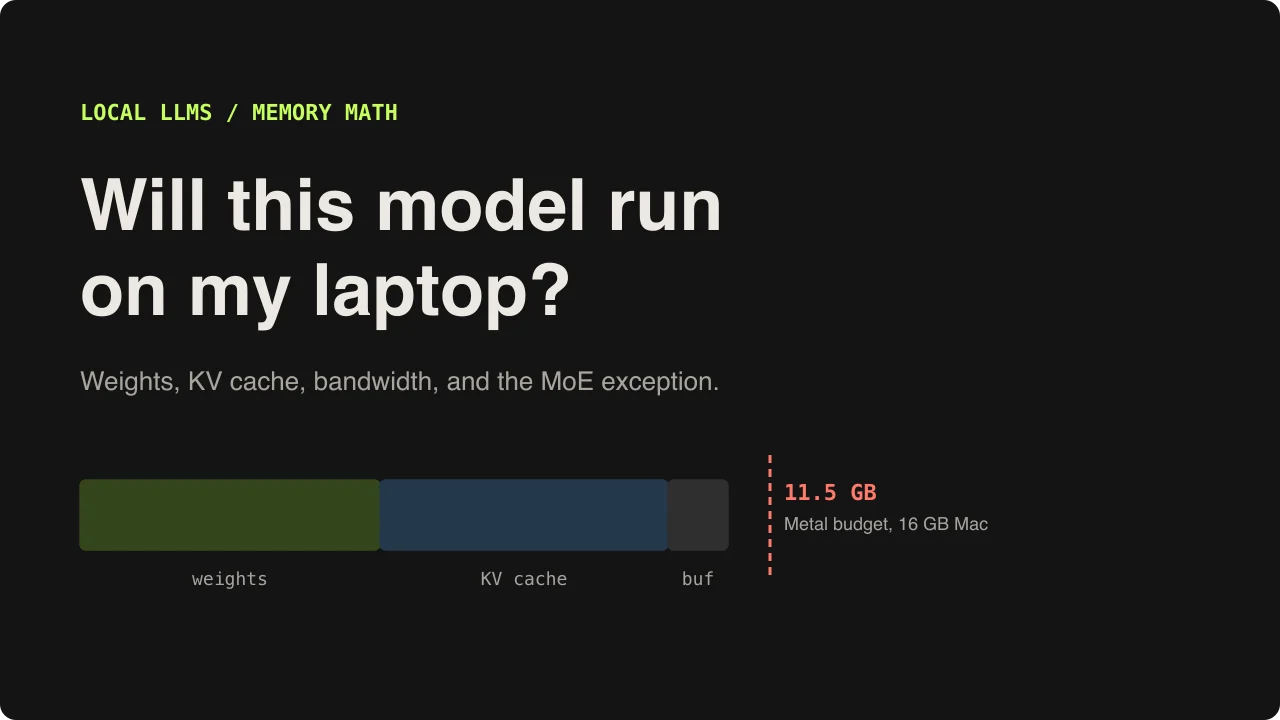
The usual way people pick a local model goes like this. A model is trending, you pull 18 GB of weights over a slow connection, you start it, and it types four words a second while your fans spin up. You decide local LLMs are for people with a 4090 and go back to the API.
I have done exactly that on my own laptop, an M1 Pro with 16 GB of RAM. What I do now is a few minutes of arithmetic first. Whether a model runs on a machine, and roughly how fast, is not a matter of opinion. It falls out of two numbers: how many bytes the model needs to keep in memory, and how many bytes it has to read for every token it writes.
This post is that arithmetic, worked through with real model configs, plus the llama.cpp flags that act on each part of it. Every number below comes from a small Python script you can copy and point at your own hardware.
The two numbers that decide everything
Memory decides whether the model loads at all. It is the weights, plus the KV cache for your context, plus a little working space for the runtime. If that total fits in the memory your GPU can use, everything runs on the GPU. If it doesn't, some of it moves somewhere slower, and the speed drops off a cliff.
Bandwidth decides how fast it can generate. To produce one token, the model reads every weight it uses out of memory. Every single token. The math inside is cheap next to that read, so generation speed has a hard ceiling:
tokens per second (ceiling) = memory bandwidth / bytes read per tokenReal speed lands under that ceiling, never over it. But the ceiling is enough to rule things in or out before you download anything.
Part one: the weights
A model file is its parameter count times the bytes per parameter. Quantization is what changes the second number. These are the effective bits per weight for the GGUF formats llama.cpp, Ollama and LM Studio load, including the small per-block scale factors each format stores:
F16      16.0  bits/weight   ~2.0  GB per billion params
Q8_0      8.5  bits/weight   ~1.06 GB per billion
Q6_K      6.56 bits/weight   ~0.82 GB per billion
Q4_K_M    4.85 bits/weight   ~0.61 GB per billion
MXFP4     4.25 bits/weight   ~0.53 GB per billion  (gpt-oss experts)
So Qwen3-8B at Q4_K_M is about 8.2 x 0.61 = 5.0 GB, and Qwen3-14B is about 9.0 GB. Q4_K_M is the default for a reason: it keeps most of the quality at under a third of the F16 size. Go to Q5 or Q6 when you have room and the work is exact (code, JSON, maths). Below Q4 is for squeezing a model in, and I wouldn't trust it for tool calls, where one broken quote in the JSON is a failed request.
Part two: the KV cache, which nobody budgets for
While a model reads your prompt, every layer stores a key and a value vector for every token, so it doesn't have to recompute them for the next token. That store is the KV cache, and it grows linearly with context length. On a long context it can be as big as the weights.
The size comes straight from the model's config.json:
KV bytes = 2 (K and V) x layers x kv_heads x head_dim x bytes_per_number x context_tokensYou can read those fields without downloading the model:
$ curl -sL https://huggingface.co/Qwen/Qwen3-14B/resolve/main/config.json \
    | python3 -c "import json,sys; c=json.load(sys.stdin); print({k: c[k] for k in ['num_hidden_layers','num_key_value_heads','head_dim']})"
{'num_hidden_layers': 40, 'num_key_value_heads': 8, 'head_dim': 128}
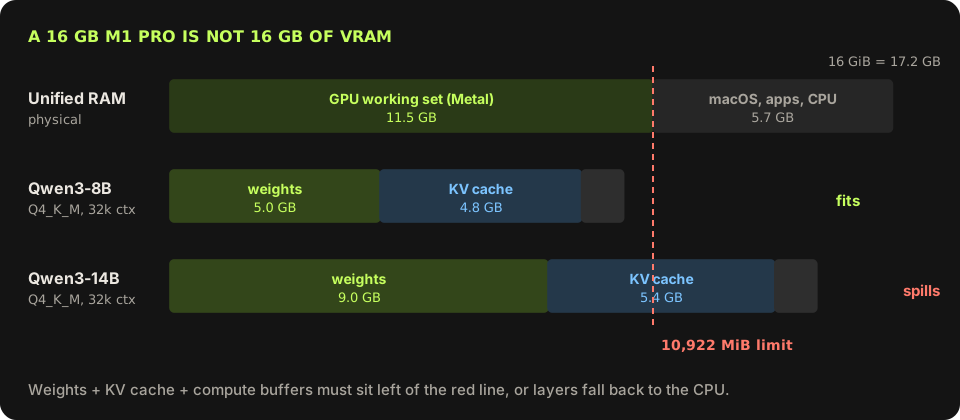
For Qwen3-14B with an F16 cache, that is 2 x 40 x 8 x 128 x 2 bytes = 163,840 bytes, or 160 KB, for every token of context. At 32k tokens the cache alone is 5.4 GB, more than half the size of the weights.
Two details in the config change this a lot. The first is num_key_value_heads. Qwen3-14B has 40 attention heads but only 8 KV heads (grouped-query attention), so its cache is five times smaller than it would be with one KV head per attention head. The second is sliding-window attention. gpt-oss-20b alternates layers: 12 use full attention, and 12 only look back 128 tokens, so half its layers have a cache that never grows past 128 tokens. That is why its 32k cache is about 0.8 GB while Qwen3-14B's is 5.4 GB.
The Mac trap: 16 GB of RAM is not 16 GB of VRAM
Apple Silicon has unified memory, so the GPU and CPU share the same RAM. That is great for local models, but macOS does not let the GPU take all of it. llama.cpp will tell you the real budget:
$ llama-server --list-devices
  MTL0: Apple M1 Pro (10922 MiB, 10922 MiB free)
On my 16 GB machine Metal allows 10,922 MiB, about 11.5 GB. That is the number to budget against, not 16. Anything past it either falls back to the CPU or fails to load.
You can raise the limit. On recent macOS versions the GPU wired-memory cap is a sysctl, and 0 means the default:
$ sysctl iogpu.wired_limit_mb
iogpu.wired_limit_mb: 0

# allow the GPU 13 GB until the next reboot
$ sudo sysctl iogpu.wired_limit_mb=13312A script that answers it for any model
Put the three parts together and you have the whole check. This is the script I use. Add a model by copying five numbers out of its config.json:
# fit.py: will this model run on my machine, and how fast can it possibly go?
# Numbers come from each model's config.json on Hugging Face.

BPW = {"F16": 16.0, "Q8_0": 8.5, "Q6_K": 6.56, "Q4_K_M": 4.85, "MXFP4": 4.25}
KV_BYTES = {"f16": 2, "q8_0": 1.0625}  # bytes per cached number

MODELS = {
    #                total B, active B, layers, kv_heads, head_dim, full-attention layers
    "Qwen3-8B":      dict(total=8.2,  active=8.2,  layers=36, kv=8, hd=128, full=36),
    "Qwen3-14B":     dict(total=14.8, active=14.8, layers=40, kv=8, hd=128, full=40),
    "Qwen3-32B":     dict(total=32.8, active=32.8, layers=64, kv=8, hd=128, full=64),
    "Qwen3-30B-A3B": dict(total=30.5, active=3.3,  layers=48, kv=4, hd=128, full=48),
    "gpt-oss-20b":   dict(total=20.9, active=3.6,  layers=24, kv=8, hd=64,  full=12, window=128),
}

def weights_gb(m, quant):
    return m["total"] * BPW[quant] / 8

def kv_gb(m, ctx, kv_type="f16"):
    per_token_layer = 2 * m["kv"] * m["hd"] * KV_BYTES[kv_type]  # K and V
    full = m["full"] * ctx
    sliding = (m["layers"] - m["full"]) * min(ctx, m.get("window", ctx))
    return per_token_layer * (full + sliding) / 1e9

def ceiling_tps(m, quant, bandwidth_gbs):
    bytes_per_token = m["active"] * BPW[quant] / 8  # GB read for every token
    return bandwidth_gbs / bytes_per_token

if __name__ == "__main__":
    BUDGET_GB = 10922 * 1.048576 / 1000  # what Metal reports as usable on a 16 GB M1 Pro
    BW = 200  # GB/s, M1 Pro
    OVERHEAD = 1.0  # compute buffers and runtime, GB
    print(f"GPU budget: {BUDGET_GB:.1f} GB, bandwidth {BW} GB/s\n")
    print(f"{'model':15} {'quant':7} {'weights':>8} {'kv@8k':>6} {'kv@32k':>7} {'total@32k':>9} {'fits':>5} {'ceiling':>9}")
    for name, m in MODELS.items():
        quant = "MXFP4" if name.startswith("gpt-oss") else "Q4_K_M"
        w, k8, k32 = weights_gb(m, quant), kv_gb(m, 8192), kv_gb(m, 32768)
        total = w + k32 + OVERHEAD
        fits = "yes" if total <= BUDGET_GB else "no"
        print(f"{name:15} {quant:7} {w:7.1f}G {k8:5.2f}G {k32:6.2f}G {total:8.1f}G {fits:>5} {ceiling_tps(m, quant, BW):6.0f} t/s")
    m = MODELS["Qwen3-14B"]
    print(f"\nQwen3-14B KV at 32k: f16 {kv_gb(m, 32768):.2f} GB, q8_0 {kv_gb(m, 32768, 'q8_0'):.2f} GB")
Its output for my M1 Pro, at 200 GB/s of memory bandwidth:
$ python3 fit.py
GPU budget: 11.5 GB, bandwidth 200 GB/s

model           quant    weights  kv@8k  kv@32k total@32k  fits   ceiling
Qwen3-8B        Q4_K_M      5.0G  1.21G   4.83G     10.8G   yes     40 t/s
Qwen3-14B       Q4_K_M      9.0G  1.34G   5.37G     15.3G    no     22 t/s
Qwen3-32B       Q4_K_M     19.9G  2.15G   8.59G     29.5G    no     10 t/s
Qwen3-30B-A3B   Q4_K_M     18.5G  0.81G   3.22G     22.7G    no    100 t/s
gpt-oss-20b     MXFP4      11.1G  0.20G   0.81G     12.9G    no    105 t/s

Qwen3-14B KV at 32k: f16 5.37 GB, q8_0 2.85 GB
A few things jump out before I've downloaded a byte:
- Qwen3-8B fits with a full 32k context. It is the safe pick for this machine.
- Qwen3-14B does not fit at 32k, but at 8k it needs 9.0 + 1.3 + 1.0 = 11.3 GB, right at the edge. With a q8_0 cache it has a little room. The context length you ask for is the difference between fitting and not.
- Qwen3-32B is out. Even if it loaded, the ceiling is 10 tokens a second.
- The two MoE models are the strange rows. They are bigger than Qwen3-14B, yet their speed ceiling is four to five times higher.
The script's gpt-oss-20b weight figure is low: only its expert weights are MXFP4, and the real file is about 12 GB. It still misses the default budget by a GB or two, which is exactly the kind of near miss the next sections fix.
Part three: bandwidth, and why everyone says buy a GPU
Here are rough peak bandwidth numbers for common hardware. These are the spec sheet figures, and real reads get maybe 70 to 90 percent of them:
Dual-channel DDR5-5600 desktop     ~90 GB/s
Apple M1 Pro / M2 Pro              200 GB/s
Apple M4 Pro                       273 GB/s
RTX 3060 12 GB                     360 GB/s
Apple M4 Max (top bin)             546 GB/s
RTX 4090                         1,008 GB/s
Run the dense Qwen3-14B through the formula. It reads all 9 GB for every token. On my Mac that caps it at 200 / 9 = 22 tokens per second. On a desktop with no GPU, 90 / 9 = 10. On a 4090, about 110. That spread is the whole reason GPUs dominate local inference: they are not mostly faster at maths here, they have far wider memory buses.
The exception: mixture-of-experts models
Most new open models are mixture-of-experts (MoE). Each layer has many small feed-forward networks, the experts, and a router picks a few of them for each token. Qwen3-30B-A3B has 128 experts per layer and uses 8. The name tells you both numbers: 30B parameters in total, about 3B active per token.
That splits the earlier math in two:
- Memory is set by total parameters. Every expert has to live somewhere, because the next token might pick any of them. Qwen3-30B-A3B is still an 18.5 GB file.
- Speed is set by active parameters. Each token reads only attention, the shared weights and its chosen experts: about 2 GB for Qwen3-30B-A3B at Q4_K_M. 200 / 2 gives a ceiling near 100 tokens per second.
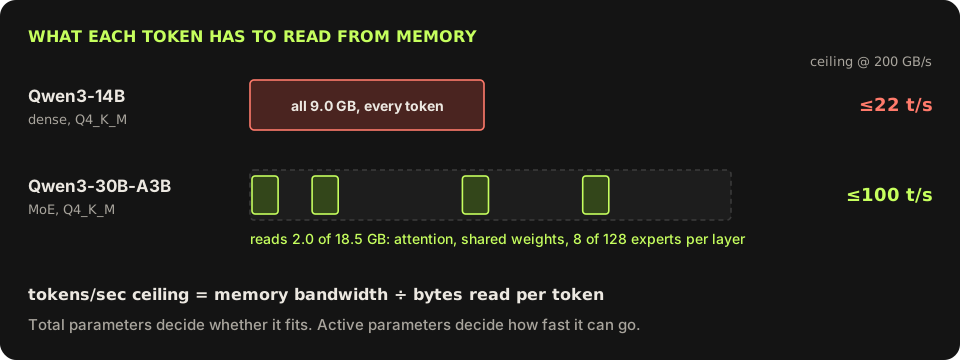
This changes where the weights can live. A dense model punishes you for keeping any of it in slow memory, because every token touches all of it. An MoE model only touches a small slice per token, so the bulk of it, the experts, can sit in slower memory and only the slice it needs gets read. The parts every token uses (attention, the shared layers, the KV cache) stay on the fast side.
Putting experts in system RAM with llama.cpp
llama.cpp has flags for exactly this. From the help text of the build on my machine (version 0.6.0, build 11429):
$ llama-server --help | grep -A1 moe
-cmoe, --cpu-moe          keep all Mixture of Experts (MoE) weights in the CPU
-ncmoe, --n-cpu-moe N     keep the Mixture of Experts (MoE) weights of the first N layers in the CPU
On a PC with a discrete GPU, the usual setup is to ask for everything on the GPU and then send some layers' experts back to system RAM:
# a 30B-A3B MoE on a 12 GB card with 32 GB of system RAM
$ llama-server -hf unsloth/Qwen3-30B-A3B-GGUF:Q4_K_M \
    -ngl all --n-cpu-moe 30 -c 32768 -fa on --port 8080
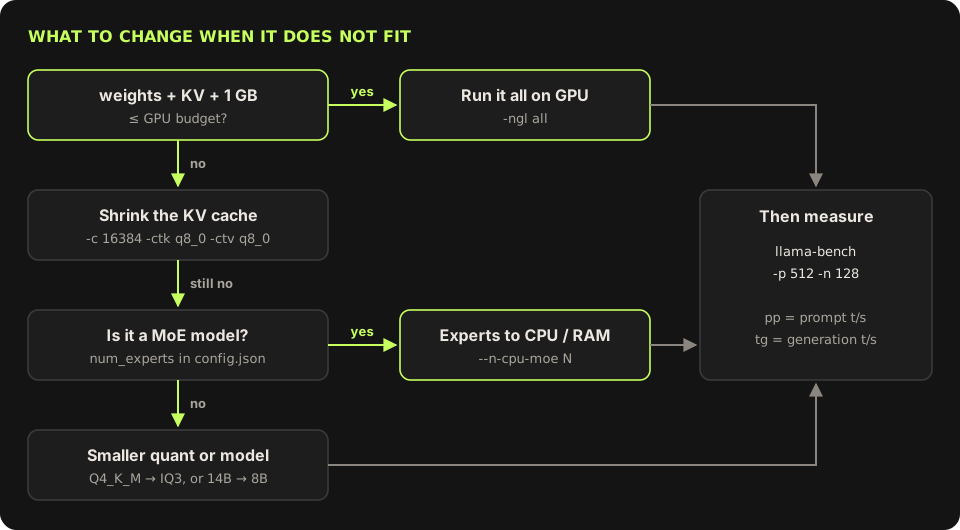
-ngl all puts every layer on the GPU, and --n-cpu-moe 30 is the exception: the experts of the first 30 of its 48 layers stay in system RAM, where the CPU computes them. Lower N until the GPU is nearly full; each step moves one more layer of experts onto the card. The best value depends on your card, your CPU and your RAM speed, so try three values and keep the fastest.
On a Mac the trade is different, and it took me a minute to see why. With unified memory, the experts are in the same RAM either way. What --n-cpu-moe changes is who computes them: CPU-side weights don't count against the Metal limit, so it frees GPU budget, at the cost of the CPU cores doing that work with less bandwidth than the GPU gets. For gpt-oss-20b on a 16 GB Mac, that is the fix for the near miss above:
# gpt-oss-20b: about 12 GB of weights, 24 layers
$ llama-server -hf ggml-org/gpt-oss-20b-GGUF \
    -c 16384 --n-cpu-moe 4 -fa on --port 8080
Each of its layers holds roughly 0.45 GB of experts, so four layers on the CPU frees close to 2 GB of Metal budget. The other route is the sysctl from earlier: raise the limit to about 13 GB and keep it all on the GPU. Which one is faster is a measurement, not a guess, and that is what llama-bench is for.
Shrinking the KV cache
When the weights fit but the total doesn't, cut the cache before you cut the model:
# 16k context instead of the model's default, cache stored as 8-bit
$ llama-server -hf Qwen/Qwen3-14B-GGUF:Q4_K_M \
-c 16384 -ctk q8_0 -ctv q8_0 -fa on --port 8080- Set
-cyourself. The default is0, which means the model's full trained context, 40,960 tokens for Qwen3 and 131,072 for gpt-oss. Most chats never need that. -ctk q8_0 -ctv q8_0stores keys and values in 8 bits. For Qwen3-14B at 32k, that is 2.85 GB instead of 5.37 GB. Quality loss at q8_0 is small; q4_0 saves more and costs more.-fa onturns on flash attention, which a quantized V cache needs and which also cuts the compute buffer.
Measure, don't trust the ceiling
The formula tells you what is impossible. llama-bench tells you what you actually get, and it reports the two phases separately:
$ llama-bench -m ~/models/Qwen3-8B-Q4_K_M.gguf -p 512 -n 128 -fa 1
# pp512 = prompt processing, tokens/s while reading a 512-token prompt
# tg128 = text generation, tokens/s while writing 128 tokens
Those two numbers behave differently, and the difference matters for what you use a local model for. Generation (tg) is bandwidth-bound, the part this whole post has been about. Prompt processing (pp) handles many tokens at once, so it is compute-bound, and it is where CPUs and offloaded experts hurt most. A setup that writes at a comfortable speed can still take a long time to read a 20,000-token document before writing anything. If your use is long inputs and short answers, like summarising files or RAG over a repo, measure pp with your real prompt size, not just tg.
Once a model is running, llama-server speaks the OpenAI chat API, so anything that talks to OpenAI can talk to it:
$ curl -s http://localhost:8080/v1/chat/completions \
    -H 'Content-Type: application/json' \
    -d '{"messages":[{"role":"user","content":"Classify: \"refund not received\". One word."}]}' \
  | python3 -c "import json,sys; print(json.load(sys.stdin)['choices'][0]['message']['content'])"
Where local still loses
I like running models locally, but I don't want to oversell it:
- It is a tier below the frontier. What fits on a laptop is good at classification, extraction, short summaries and routing. Long agentic coding and hard reasoning still belong to the big hosted models.
- It is tuned for one user. Everything clever above, from expert offload to a quantized cache, assumes a batch of one. The moment several people share the box, you want the whole model on the GPU and a batching server like vLLM.
- Long prompts are slow. See
ppabove. Chat feels fine long before document work does. - RAM is not cheap any more. Expert offload assumes spare system memory, and memory prices have climbed hard this year as fabs moved capacity to datacenter HBM. Check what an upgrade costs before planning a build around it.
Where it wins is the boring, high-volume work, and work where the data can't leave the machine. I wrote about cutting LLM API cost by routing simple calls to small models; a local 8B model is the far end of that idea, with a per-token price of zero. For extraction, a small specialised model sometimes beats a general LLM outright. And for air-gapped software, local is the only option there is.
What I'd do this weekend
- Run
llama-server --list-devices(or check your VRAM) and write down the real budget. - Look up your memory bandwidth. That number caps every model you'll ever run on the machine.
- Copy
fit.py, add the two or three models you are curious about from their config.json, and run it. - Download only the ones that fit. Start one with an explicit
-cand-fa on. - Run
llama-benchwith a prompt size close to your real work. If it is a MoE model, try three values of--n-cpu-moeand keep the best.
The question used to be which GPU you own. With MoE models and expert offload it is closer to how much memory you have of any kind, and how long you are willing to wait per token. That is a much better question, and you can answer most of it with a calculator.
Frequently asked questions
How do I know if an LLM will fit in my GPU or Mac memory?
Add three things: the weights (parameters times bytes per weight, about 0.6 GB per billion parameters at Q4_K_M), the KV cache (2 x layers x KV heads x head dim x 2 bytes x context length, from the model's config.json), and about 1 GB for compute buffers. If the total is under your usable GPU memory, it fits. On a Mac, usable means the Metal limit that llama-server --list-devices prints, which is about two thirds of RAM on a 16 GB machine.
How much memory does the KV cache use?
It depends on the model's layer count, KV heads and head size, and it grows linearly with context. Qwen3-14B uses about 160 KB per token with an F16 cache, so 5.4 GB at 32k tokens. An 8-bit cache (-ctk q8_0 -ctv q8_0 in llama.cpp) roughly halves it, and a shorter -c shrinks it in proportion.
Why are MoE models faster than dense models of the same size?
Generation speed is limited by how many bytes are read from memory per token. A dense model reads all its weights for every token. A mixture-of-experts model reads only the experts the router picks, so Qwen3-30B-A3B reads about 2 GB per token at Q4_K_M even though the file is 18.5 GB. Memory still has to hold all of it, but speed follows the active parameters.
What does --n-cpu-moe do in llama.cpp?
It keeps the expert weights of the first N layers in system RAM, computed by the CPU, while everything else stays on the GPU. Because each token only reads a few experts, this costs much less speed than offloading whole layers of a dense model. Combine it with -ngl all and lower N until the GPU is nearly full.
Can I give the GPU more memory on an Apple Silicon Mac?
Yes. sudo sysctl iogpu.wired_limit_mb=<MB> raises the GPU wired-memory limit until the next reboot. Leave at least 3 GB for macOS and your apps, or the system starts swapping and everything gets slower.