· 7 min read
Building desktop software for a network that never touches the internet
Kote is an armoury and asset custody app in use by a unit of the Pakistan Army. No server, no cloud, no updater. Here is how Electron, SQLite and some paranoia make that work.
Most advice for building software assumes a server somewhere. Kote has none. It is an armoury and asset custody system in use by a unit of the Pakistan Army, and the PCs it runs on sit on a closed network or no network at all. Some of them are old enough that 32-bit Windows is a supported target. There is no IT team to run a database and no internet to fetch an update.
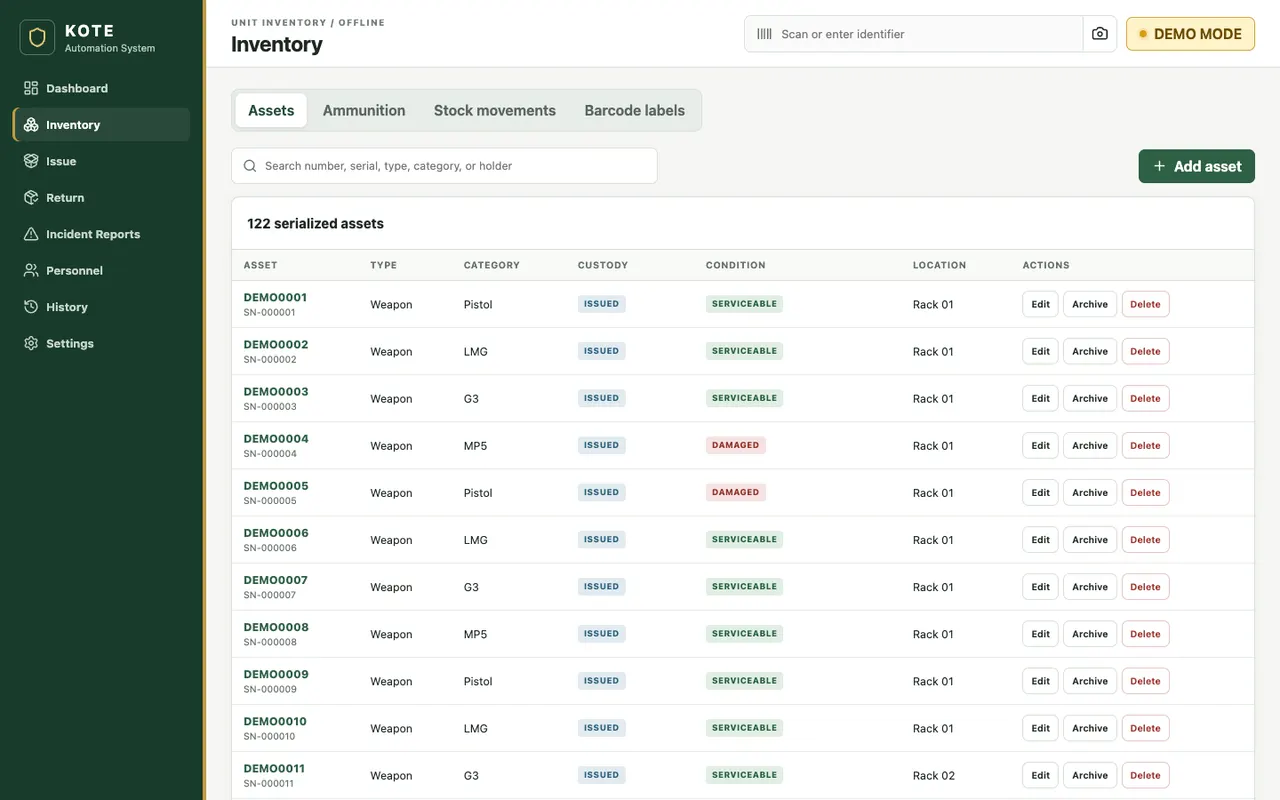
The job sounds simple: know at any moment which weapon or ammunition lot is where, and who holds it. The constraints are what make it hard. Here are the decisions they forced, with the real code.
The shape of the app
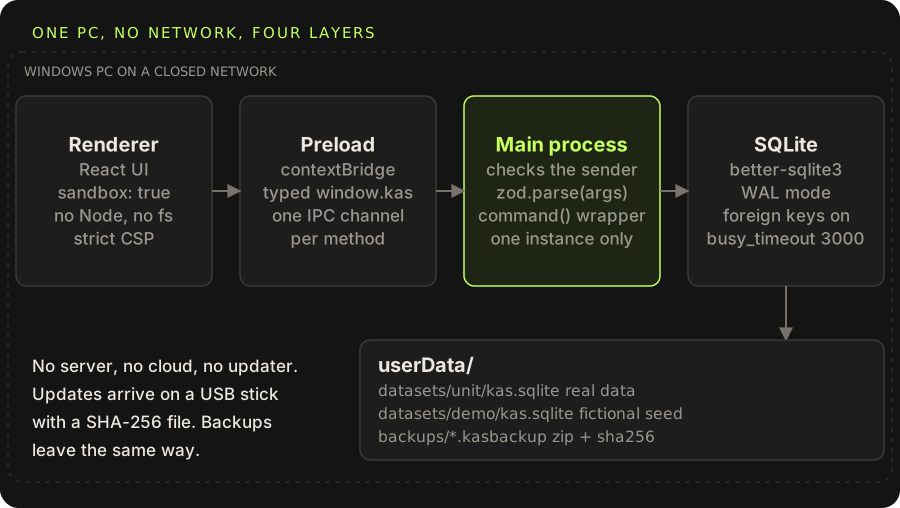
It is one Electron program per office PC. React draws the UI, SQLite (through better-sqlite3) holds the data, and the two only talk through a narrow, typed bridge. It installs with a per-user NSIS installer, needs no admin rights, no database setup and no login screen. The Windows account and the locked room are the access boundary, and the documentation says so plainly.
Packaging a native module is the first wall
better-sqlite3 is a native addon, which means it is compiled against a specific ABI. Vitest runs on Node. The app runs on Electron. They need different builds of the same module, and getting this wrong shows up as a crash on someone else's machine, not yours.
The scripts make the switch explicit:
{
  "scripts": {
    "predev": "electron-builder install-app-deps",
    "test": "npm rebuild better-sqlite3 --silent && vitest run",
    "test:e2e": "npm run build && electron-rebuild -f -w better-sqlite3 && playwright test"
  },
  "build": {
    "asarUnpack": ["node_modules/better-sqlite3/**/*"],
    "nsis": { "oneClick": false, "perMachine": false, "allowToChangeInstallationDirectory": true },
    "win": { "target": [{ "target": "nsis", "arch": ["x64", "ia32"] }] }
  }
}
asarUnpack matters because a .node file cannot be loaded from inside an asar archive. Electron is pinned to 43, because 44 dropped 32-bit Windows.
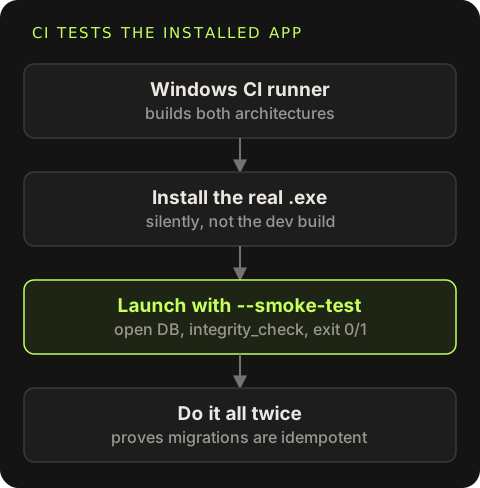
The best decision here was the CI check. A Windows runner builds both architectures, installs the real .exe silently, and launches the installed app with a --smoke-test flag that opens the database, runs PRAGMA integrity_check and exits with 0 or 1. It does that twice, so the second run proves migrations are idempotent. Testing the dev build would have proven nothing about a clean office PC.
A custody record must never be written twice
Double clicks, a slow screen, a re-render that resubmits a form. On a single PC with no network you might think duplicates are not a concern. They are, because the cost of "issued the same rifle twice" is a very bad afternoon.
Every write goes through one wrapper. The UI sends an idempotency key with each command, and the main process stores a receipt in the same transaction as the change:
private command<T>(actor: Actor, type: string, input: { idempotencyKey: string }, work: () => T): T {
  const hash = payloadHash(input)
  const prior = this.db.prepare('SELECT * FROM command_receipts WHERE idempotency_key=?').get(input.idempotencyKey)
  if (prior) {
    if (prior.payload_hash !== hash || prior.command_type !== type) throw new Error('IDEMPOTENCY_CONFLICT')
    return JSON.parse(prior.response_json)
  }
  return this.db.transaction(() => {
    const response = work()
    this.db.prepare('INSERT INTO command_receipts VALUES(?,?,?,?,?,?)')
      .run(input.idempotencyKey, type, hash, JSON.stringify(response), actor.id, Date.now())
    return response
  })()
}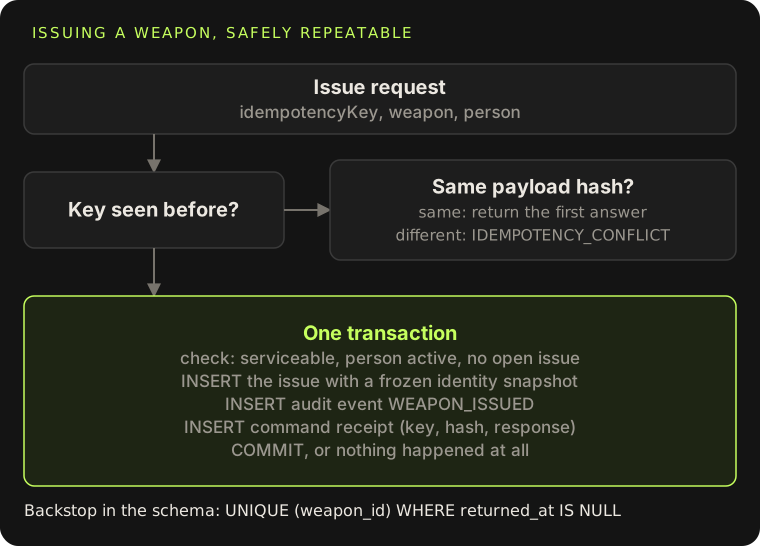
The same key with the same payload returns the first answer, so a retry is harmless. The same key with a different payload is a bug and fails loudly. Below all of that, the schema has the last word:
CREATE UNIQUE INDEX one_open_issue_per_weapon ON issues(weapon_id) WHERE returned_at IS NULL;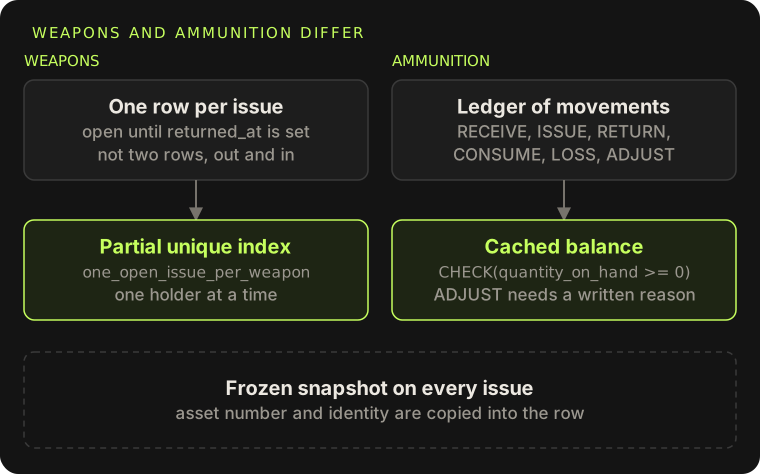
An issue is one row that is open until returned_at is set, not two rows for "out" and "in". The partial unique index turns "one holder at a time" into a database fact. Ammunition works differently: it is a ledger of signed movements (RECEIVE, ISSUE, RETURN, CONSUME, LOSS, ADJUST), with a cached balance guarded by CHECK(quantity_on_hand >= 0) and a written reason required for any adjustment.
Two smaller rules came from the same thinking. The issue row stores a frozen snapshot of the asset number and the person's identity, so editing a person later cannot rewrite who held what. And records with history cannot be deleted, only archived.
The audit event is part of the change
The audit row is written inside the same transaction as the change it describes. If the transaction commits, the event exists. If it rolls back, there is no event for something that did not happen. That one rule removes a whole class of "the log says X but the data says Y" problems.
The README and this post are both plain about the limits. The log is append-only by convention, not by trigger or hash chain. When the app was simplified to one local operator, the trail stopped recording which person did something, only what happened. For this deployment the room and the Windows account are the control. If I built it again I would keep per-person sign-in.
Scanners that cannot act on their own
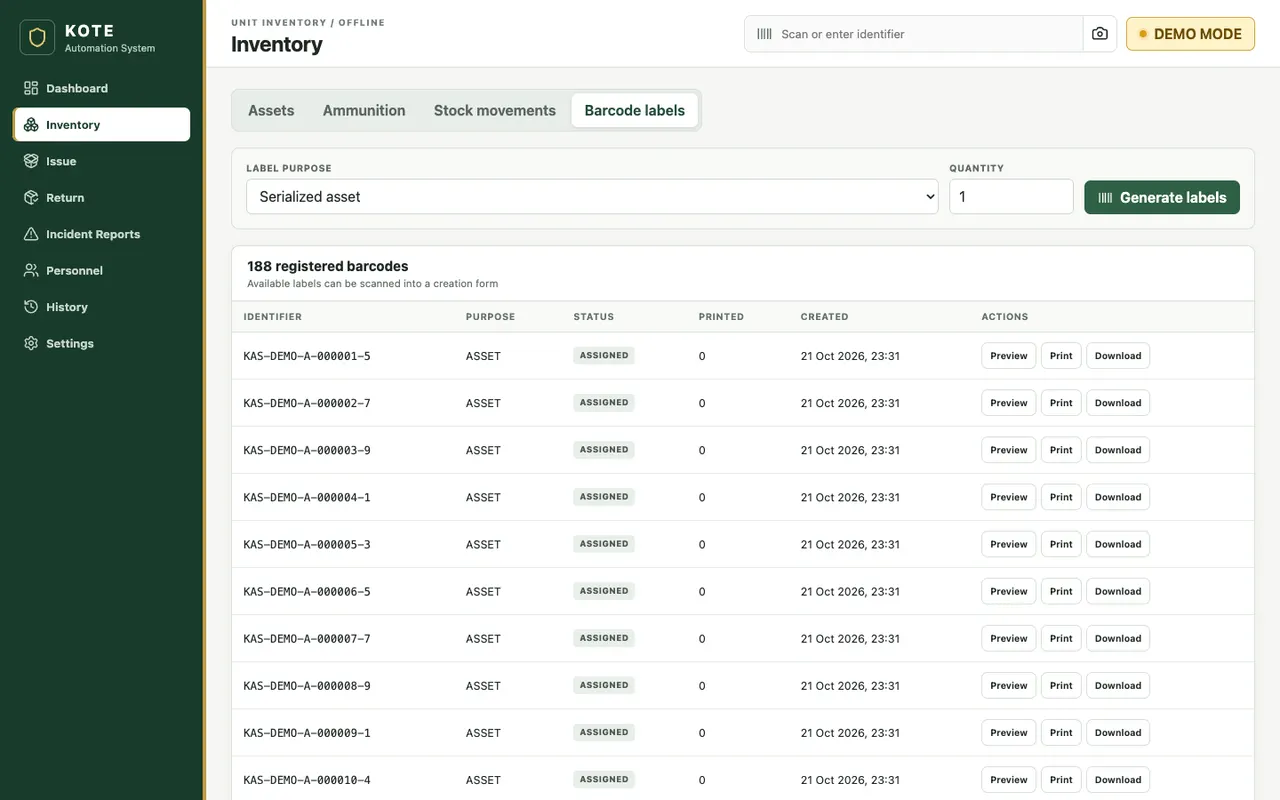
The app accepts three kinds of input: a USB scanner that types like a keyboard (detected as a burst of 4 or more characters with gaps under 50 ms, ending in Enter), the camera through BarcodeDetector with a ZXing fallback, and an image file. All three resolve to a record and open it in a side panel. That is all a scan does. A scan never issues, returns, deletes or adjusts stock by itself. A person confirms every action.
Backups and restore, where restore is the dangerous one
Backups run on open and then hourly, and only write a new one if the last success is older than 24 hours. Each .kasbackup is a ZIP with the database (taken through SQLite's online backup API, so it is consistent while the app runs), a manifest and a SHA-256. The ten newest are kept. Operators copy them to a separate USB drive, which is the off-site copy.
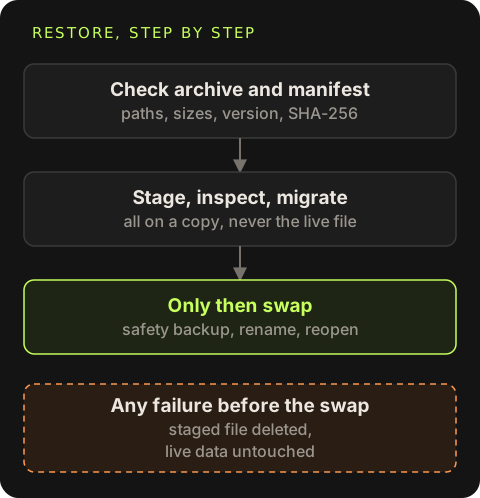
Restore replaces live data, so it gets the most care:
Check the archive
Reject any entry name with
..or a leading slash, any entry over 512 MB, and anything other than the manifest and the database.Check the manifest
Format version, same workspace (real or demo), and a SHA-256 that matches the database bytes.
Stage and inspect
Write the database next to the live one, open it read-only, run
PRAGMA integrity_check, and confirm the core tables exist.Migrate the copy
Open the staged file with the normal database class, which runs migrations on the copy and checks integrity again.
Only then swap
Take a safety backup of the live database, close it, rename the staged file into place, reopen. Any failure before this point deletes the staged file and leaves the live data untouched.
Updates on a USB stick
There is no auto-updater. An update is a new installer carried in by hand with its SHA-256 file, run over the old install. The per-user installer leaves the data folder alone.
On first open after an update, if the stored schema version is older than the app expects, the app checkpoints the WAL and copies the database to backups/pre-migration-<timestamp>.sqlite before touching it. Migrations only add: they check PRAGMA table_info before adding a column and record their version in the same transaction, so running one twice does nothing. A test deletes a migration row and reopens the database to prove that.
One thing I would fix: the "expected version" used for the pre-migration copy is a hand-written constant. Add a migration and forget to bump it, and the safety copy is silently skipped. It should come from the migration list itself.
Security without a cloud
With no server, security is about not widening the hole the PC already has:
win = new BrowserWindow({ webPreferences: { preload, nodeIntegration: false, contextIsolation: true, sandbox: true } })
win.webContents.setWindowOpenHandler(() => ({ action: 'deny' }))
win.webContents.on('will-navigate', (event) => event.preventDefault())

const handle = (channel, fn) => ipcMain.handle(channel, async (event, ...args) => {
  try { trusted(event); return ok(await fn(...args)) } catch (error) { return fail(error) }
})
The renderer gets only the typed window.kas surface: no SQL, no Node, no file system, no arbitrary IPC. Every argument is validated with zod in the main process, with a length cap on every string. The content security policy allows no remote origin. The camera permission is granted for video only. A single-instance lock stops two copies from opening the same SQLite file. The personnel schema leaves out national ID numbers, addresses, family, medical and financial data on purpose.
The things the app does not do are listed in the README as clearly as the things it does: the database is not encrypted, installers are unsigned (the SHA-256 travels with them), there is no sync between PCs, and two copied databases can never be merged. One PC is one source of truth.
What carried over to other projects
- Smoke-test the installed artifact, not the dev build.
- Idempotency keys are worth it even with one user on one machine.
- Put the audit write in the same transaction as the change.
- Snapshot identity into history rows.
- Treat restore as more dangerous than backup.
- Write down what you cannot enforce. A short "security limits" section saved more questions than any feature.