· 14 min read
Harness engineering: the skill that took over from prompt engineering
First it was prompts, then context. Now most agent failures come from the layer around the model. A technical walk through the harness I run: the tool loop, hooks and exit codes, permissions, context loading, routing and transcripts.
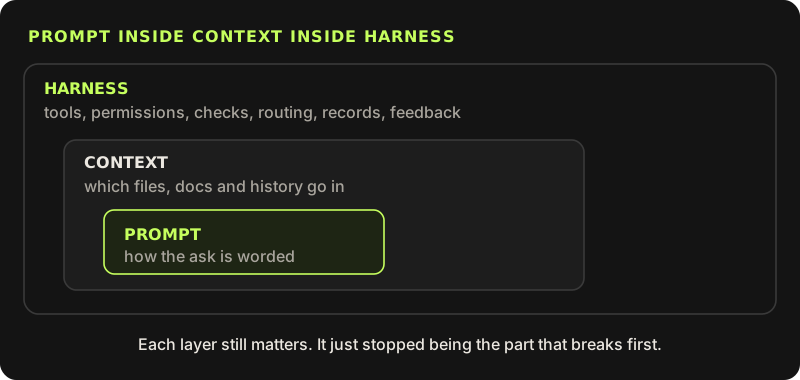
In 2024 the skill everyone talked about was prompting: find the right words and the model does the right thing. In 2025 it was context: hand the model the right files and docs, and the exact wording matters less. In 2026, when an agent fails, it is rarely the wording or the context that let it down.
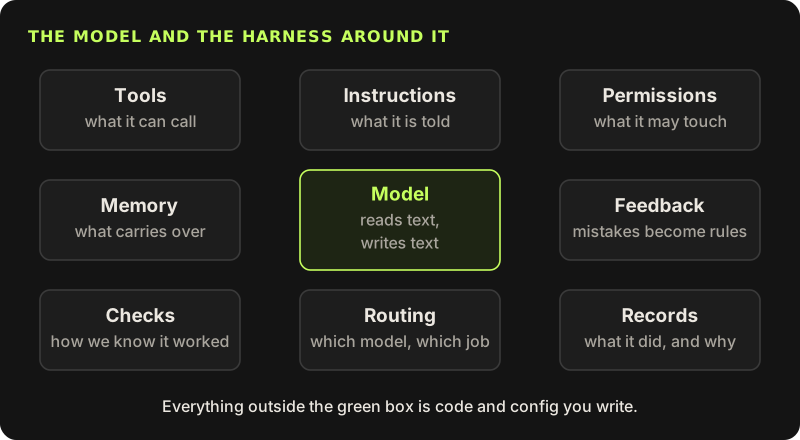
What fails now is the layer around the model: which tools it is handed, who checks its work, what it remembers between sessions, what it is allowed to touch, and whether anyone can see afterwards what it actually did. That layer has a name: the harness.
None of these shifts threw the previous one away. Good context work still includes a clear prompt, and harness work still includes choosing the context. The harness adds what wording and context cannot give you on their own: limits on tools, permissions, checks, memory, records, routing between models, and a way for every mistake to become a rule.
This post goes through the harness I run for this site and for client work, down to the files, hook scripts and data formats. Everything here is ordinary code and config.
Under the hood, the harness is a loop
A model on its own cannot run anything. It returns text, and when tools are defined, some of that output is a structured tool_use block: a tool name and a JSON input. Something outside the model has to read that block, decide whether to run it, run it, and send the result back as a tool_result block in the next request. Then the model is called again with the whole conversation. That something is the harness, and every agent, from Claude Code to a support bot, is this loop with different rules around it.
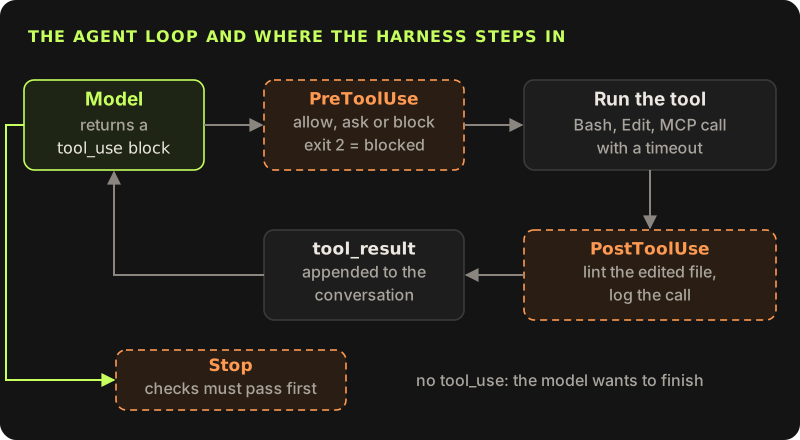
Inside a product I write this loop myself. Stripped to the parts that matter, it looks like this. Every harness concern from this post shows up as a line: a step budget, a permission check before each call, a timeout, errors returned to the model instead of thrown, and a trace entry for every tool call.
import Anthropic from '@anthropic-ai/sdk'

const client = new Anthropic()
const MAX_STEPS = 8
const TOOL_TIMEOUT_MS = 10_000

export async function runAgent(task: string, tools: ToolSet, trace: Trace) {
  const messages: Anthropic.MessageParam[] = [{ role: 'user', content: task }]

  for (let step = 0; step < MAX_STEPS; step++) {
    const res = await client.messages.create({
      model: 'claude-sonnet-5-5',
      max_tokens: 2048,
      tools: tools.definitions,
      messages,
    })
    messages.push({ role: 'assistant', content: res.content })
    if (res.stop_reason !== 'tool_use') return res // no tool call: the model is done

    const results: Anthropic.ToolResultBlockParam[] = []
    for (const call of res.content) {
      if (call.type !== 'tool_use') continue
      const started = Date.now()
      const decision = tools.check(call.name, call.input) // permissions, before anything runs
      const out = decision.allowed
        ? await withTimeout(tools.run(call.name, call.input), TOOL_TIMEOUT_MS).catch((e) => ({ error: String(e) }))
        : { error: `Not allowed: ${decision.reason}` }
      const failed = typeof out === 'object' && out !== null && 'error' in out
      trace.log({ step, tool: call.name, input: call.input, ms: Date.now() - started, failed })
      // Errors go back to the model as data, so it can try another way instead of crashing the run.
      results.push({ type: 'tool_result', tool_use_id: call.id, content: JSON.stringify(out), is_error: failed })
    }
    messages.push({ role: 'user', content: results })
  }
  throw new Error(`Stopped after ${MAX_STEPS} steps`) // the budget is part of the harness too
}
Two details in there are easy to get wrong. A failed tool should come back as a tool_result with is_error: true, not as an exception, because the model can often recover: pick a different ID, narrow a query, ask the user. And the step budget has to throw, not quietly return, so a runaway loop shows up as a failure in your logs instead of a slow, expensive success. I go further into budgets and checkpoints in agent loops for product features.
Tools: give it less than you think
Every tool definition you send is a capability, and the model will use it whenever it looks helpful. A run_sql(query) tool that accepts any statement is one bad instruction away from an UPDATE with no WHERE. A fetch(url) tool can be steered by any web page the agent reads.
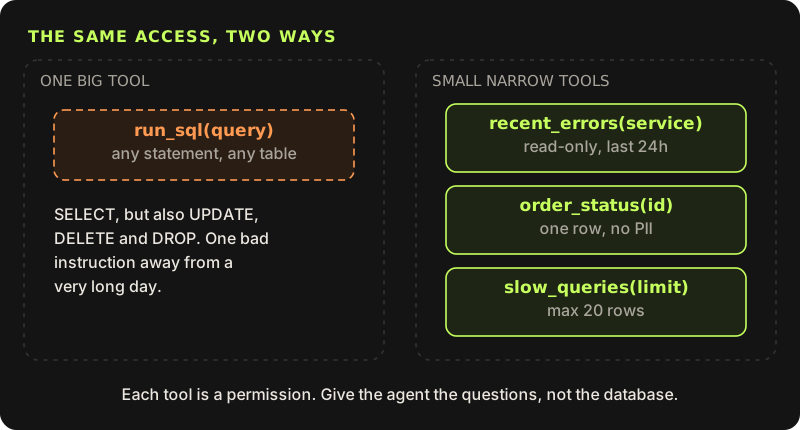
So the harness narrows tools in layers. When I gave an agent access to production data, it got an MCP server with a few named queries, each tool annotated as read-only, each query running in a READ ONLY transaction that is always rolled back, as a database role that can only SELECT from a few views and has a five-second statement timeout. Any one of those layers would stop most accidents. Together they mean the model cannot do damage even if it is tricked into trying.
CREATE ROLE mcp_readonly LOGIN PASSWORD 'from-your-secret-store';
ALTER ROLE mcp_readonly SET default_transaction_read_only = on;
ALTER ROLE mcp_readonly SET statement_timeout = '5s';

GRANT USAGE ON SCHEMA support TO mcp_readonly;
GRANT SELECT ON ALL TABLES IN SCHEMA support TO mcp_readonly;
The full server, with redaction of emails and tokens before anything leaves it, is in the read-only MCP server post.
Permissions: rules first, code when rules are not enough
Tools decide what the agent can do. Permissions decide what it may do without asking. In Claude Code the first layer is declarative: allow, ask and deny lists in .claude/settings.json. Deny rules are checked first, then ask, then allow, so a broad allow can never override a specific deny.
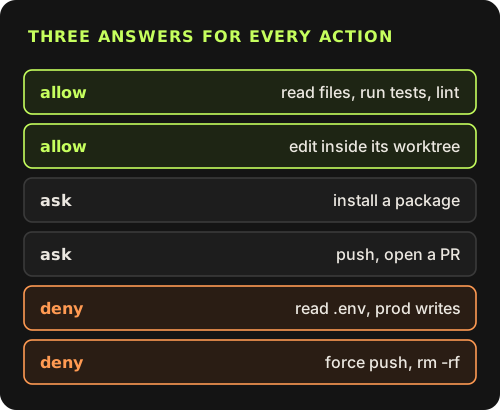
Settings files stack. My user-level ~/.claude/settings.json is permissive on purpose: it allows Bash and the browser tools outright, because I do not want a prompt for every ls. The repo then narrows that with its own .claude/settings.json, committed next to the code. Because deny wins in every scope, a project deny beats my global allow.
{
  "$schema": "https://json.schemastore.org/claude-code-settings.json",
  "permissions": {
    "deny": [
      "Read(./.env)",
      "Read(./.env.*)",
      "Read(./.claude/admin-setup.txt)",
      "Bash(git push --force:*)",
      "Bash(git push -f:*)"
    ],
    "ask": [
      "Bash(vercel --prod:*)",
      "Bash(vercel deploy --prod:*)",
      "Bash(gh pr merge:*)"
    ]
  },
  "hooks": {
    "PreToolUse": [
      {
        "matcher": "Read|Edit|Write|Bash",
        "hooks": [
          { "type": "command", "command": "\"$CLAUDE_PROJECT_DIR\"/.claude/hooks/guard.sh" }
        ]
      }
    ],
    "Stop": [
      {
        "hooks": [
          { "type": "command", "command": "\"$CLAUDE_PROJECT_DIR\"/.claude/hooks/verify.sh", "timeout": 120 }
        ]
      }
    ]
  }
}
Pattern rules have limits, though. Read(./.env) stops the Read tool, but not cat .env through Bash, and no pattern can express "only inside this worktree". For that the harness has hooks: commands it runs at fixed points in the loop. A PreToolUse hook receives the pending call as JSON on stdin and can block it.
{
  "session_id": "…",
  "transcript_path": "~/.claude/projects/…/….jsonl",
  "cwd": "/work/app",
  "hook_event_name": "PreToolUse",
  "tool_name": "Edit",
  "tool_input": { "file_path": "/work/app/src/Nav.tsx", "old_string": "…", "new_string": "…" }
}
This is the guard this repo runs, byte for byte. It reads the tool name, path and command with jq and enforces three rules: no secret file enters the context window, whether through the Read tool or a shell reader like cat or grep; no edit lands outside the project, its worktrees, the scratchpad or ~/.claude; and nothing is pushed straight to main, because every change goes through a PR.
#!/usr/bin/env bash
# PreToolUse guard: runs before every Read, Edit, Write and Bash call.
# Exit 2 blocks the call; stderr is sent back to the model as the reason.
input=$(cat)
tool=$(jq -r '.tool_name' <<<"$input")
path=$(jq -r '.tool_input.file_path // empty' <<<"$input")
cmd=$(jq -r '.tool_input.command // empty' <<<"$input")
root=${CLAUDE_PROJECT_DIR:-$(jq -r '.cwd' <<<"$input")}

# 1. Secrets never enter the context window (.env.example is fine).
env_file='(^|/)\.env($|\.[A-Za-z0-9_-]+)'
env_read='(^|[;&|(]|[[:space:]])(cat|less|more|head|tail|grep|sed|awk|source|\.)[[:space:]]([^|;&]*[[:space:]/])?\.env($|[[:space:];&|)]|\.[A-Za-z0-9_-]+)'
if { [[ "$path" =~ $env_file ]] && [[ "$path" != *.example ]]; } ||
   { [[ "$cmd" =~ $env_read ]] && [[ "$cmd" != *.env.example* ]]; }; then
  echo "Blocked: .env files hold secrets. Ask the user for the value you need." >&2
  exit 2
fi

# 2. Edits stay inside the project (or its worktrees), the scratchpad, and ~/.claude.
if [[ "$tool" =~ ^(Edit|Write)$ && -n "$path" ]]; then
  case "$path" in
    "$root"/* | /tmp/* | /private/tmp/* | "$HOME"/.claude/*) ;;
    *)
      echo "Blocked: $path is outside this project ($root)." >&2
      exit 2
      ;;
  esac
fi

# 3. Never push straight to main; open a PR from a branch.
if [[ "$cmd" =~ git[[:space:]]+push([^|\;&]*)[[:space:]](origin[[:space:]]+)?(HEAD:)?main([[:space:]]|$) ]]; then
  echo "Blocked: push a branch and open a PR instead of pushing to main." >&2
  exit 2
fi

exit 0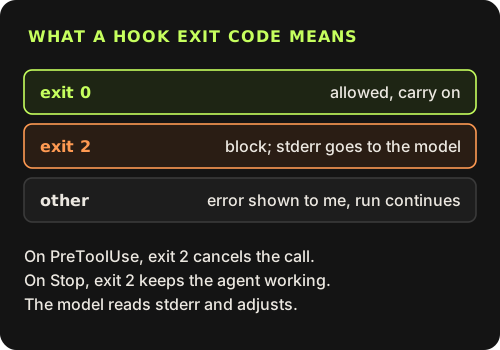
The exit code is the contract. Exit 0 lets the call through. Exit 2 blocks it, and whatever the script wrote to stderr is handed to the model as the reason, which is why the messages are written as instructions ("Ask the user for the value you need"). I keep a file of 21 sample payloads and pipe each one through the script: 10 must exit 2 and 11 must exit 0, including .env.example, a write to the memory folder, and a push to a branch called main-fix.
Those tests exist because the first version was wrong in a way I only saw once it was live. Hook config is read from disk, so the guard started working in the middle of the session that installed it, and it immediately blocked two of my own commands. One was fair: a test command that literally contained cat .env. The other was a PR description that only mentioned .env files, and the regex also matched sed inside the word "used". The fix was to anchor the pattern to a command at the start of a word, followed by an argument that is a path to an env file. The lesson is general: a guard that blocks too much gets switched off, so false positives deserve tests as much as the real catches.
Both scripts are wired in by the hooks block of the settings file above: guard.sh on PreToolUse for Read|Edit|Write|Bash, and verify.sh on Stop with a 120-second timeout.
Each agent also runs in its own git worktree, so even an allowed edit lands on a separate branch that I merge or throw away (how I run agents in parallel).
Instructions and memory: what loads before the first message
A model starts every session with an empty head. What it knows on turn one is whatever the harness puts into the context window first, and the order and size of that load matter more than any single instruction.
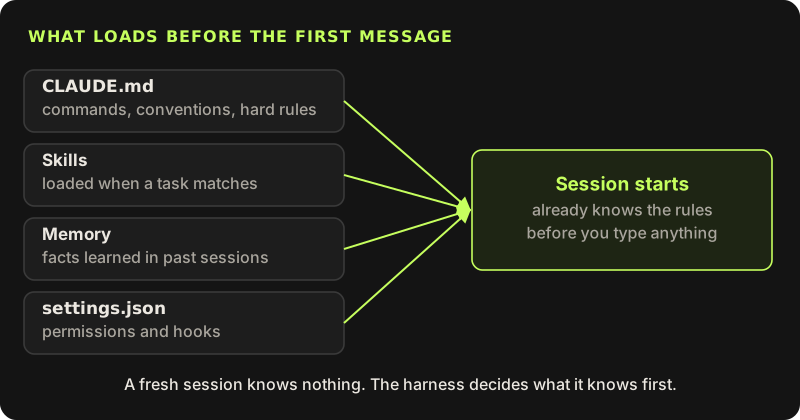
~/.claude/CLAUDE.mdloads for every project: my personal rules, like which model to use for subagents.- A
./CLAUDE.mdin the repo, when there is one, loads next: commands, conventions and hard rules for this codebase. ACLAUDE.mdinside a subfolder is pulled in only when the agent works with files there, so module-specific rules cost nothing elsewhere. - Skills are folders with a
SKILL.md. Only thenameanddescriptionfrom each file's frontmatter sit in context; the body loads when a task matches. That is how a session can have dozens of skills available without paying for all of them. - Memory is a folder of small notes plus a
MEMORY.mdindex. The index loads at the start; a note is read only when its one-line description looks relevant.
---
name: daily-blog-crosspost
description: Daily 10 AM: cross-post one not-yet-posted blog post from mahmadmanzoor.com to dev.to and Hashnode with canonical URL back to the site, verify, and report with screenshots.
---
(the steps below this line load only when the skill is used)
The practical rule I keep relearning: instructions only work if they are short and checkable. "Write clean code" changes nothing. "Client work is described with screenshots only, never a repo link" changes behaviour on the first try, and I can grep for violations. More in agent instructions that actually change behaviour.
Checks: done is a claim until something proves it
This is the part I would build first if I were starting again. An agent saying "everything works now" is reporting intent. The harness should make it produce evidence: typecheck, lint, build, a bundle budget, and screenshots for anything visual.
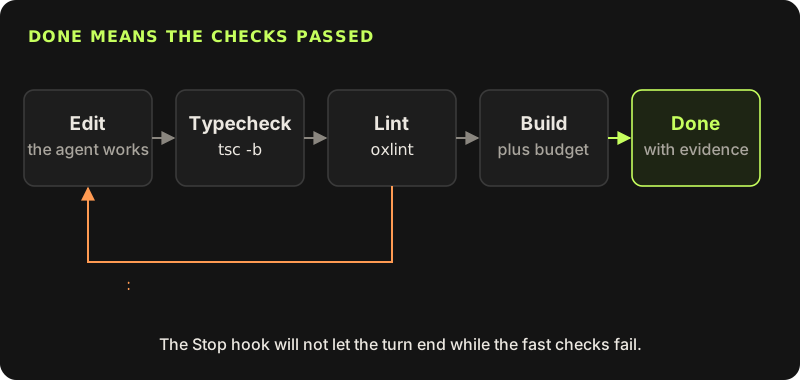
Mechanically this is the same hook contract as the guard, attached to a different point in the loop. When the model returns no tool_use and wants to end its turn, the Stop hook runs. If any TypeScript or JavaScript file changed, it runs tsc -b and oxlint. If either fails, the hook exits 2, the errors become the next message, and the loop continues.
#!/usr/bin/env bash
# Stop hook: runs when the agent says it is done.
# If source files changed and typecheck or lint fails, exit 2 keeps the agent
# working and sends the errors back to it.
input=$(cat)
cd "${CLAUDE_PROJECT_DIR:-$(jq -r '.cwd' <<<"$input")}" || exit 0

# Second stop in a row after a block: let it end, so a fix it cannot make
# does not loop forever. The failure is still printed to the user.
active=$(jq -r '.stop_hook_active // false' <<<"$input")

# Only check when code changed (staged, unstaged or untracked).
changed=$( { git diff --name-only HEAD; git ls-files --others --exclude-standard; } 2>/dev/null |
  grep -E '\.(ts|tsx|js|mjs)$' )
[[ -z "$changed" ]] && exit 0

out=$( { npx --no-install tsc -b && npx --no-install oxlint; } 2>&1 )
if [[ $? -ne 0 ]]; then
  if [[ "$active" == "true" ]]; then
    echo "verify.sh: checks still failing after one retry, stopping anyway." >&2
    exit 0
  fi
  echo "Checks failed. Fix these before you finish:" >&2
  tail -n 40 <<<"$out" >&2
  exit 2
fi
exit 0
Three details matter. It only runs when code changed, so a turn that edits a blog draft costs nothing, and a turn that touches code costs about 3.5 seconds. The stop_hook_active flag in the input is true when the agent is already continuing because of this hook, so the script blocks at most once and does not trap the agent on an error it cannot fix. And it is only the fast checks: the build, the bundle budget and anything slow stay in CI, which runs on every PR (make coding agents prove their work). I tested it by planting const n: number = "oops": exit 2 with the TS2322 error, then exit 0 on the second stop. For LLM features inside a product, the same idea is an eval set that runs before anyone touches the prompt (evals before prompts).
Routing: the right model for each job
Routing works because of how subagents are built. A subagent gets a fresh context window, does its job, and only its final report comes back to the main session. So the main session can hand a 40-file search to a small model and receive ten lines, instead of filling its own context with the search. The model is a parameter on that call, which makes routing a one-line decision per task.
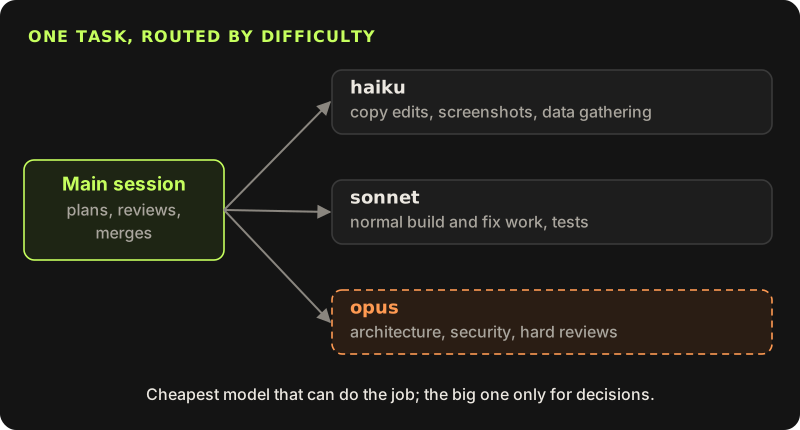
When work goes to subagents, always set the model by how hard the task is:
- haiku: copy-only edits, mechanical changes, screenshots, data gathering.
- sonnet: normal build and fix work (UI, small logic, tests).
- opus: complex work only: architecture, security, hard merges, deep reviews.
The trade-off is that the main session only sees a summary, so a subagent's mistake can hide behind a confident report. That is why the main session keeps review and merging, and why every report has a "not checked" section. More in matching the model to the task.
Records: you will want to know what happened
When something goes wrong a day later, "the agent did it" is not an answer. Claude Code writes every session to disk as JSON Lines at ~/.claude/projects/<project>/<session-id>.jsonl: one object per line, with the assistant's tool_use blocks and the tool_result that came back. That makes a session queryable with jq.
# every shell command the agent ran, in order
jq -r 'select(.type=="assistant") | .message.content[]?
       | select(.type=="tool_use" and .name=="Bash") | .input.command' session.jsonl

# which tools it used, and how often
jq -r 'select(.type=="assistant") | .message.content[]?
       | select(.type=="tool_use") | .name' session.jsonl | sort | uniq -c | sort -rn
On the long session that produced this post and the work around it, the second query reports 811 Bash calls, 255 browser batches, 89 file reads and 37 tool-schema lookups across 17,344 transcript lines. Numbers like that answer real questions: which commands the agent ran against production, when it first touched a file, how much of the session was browsing versus editing.
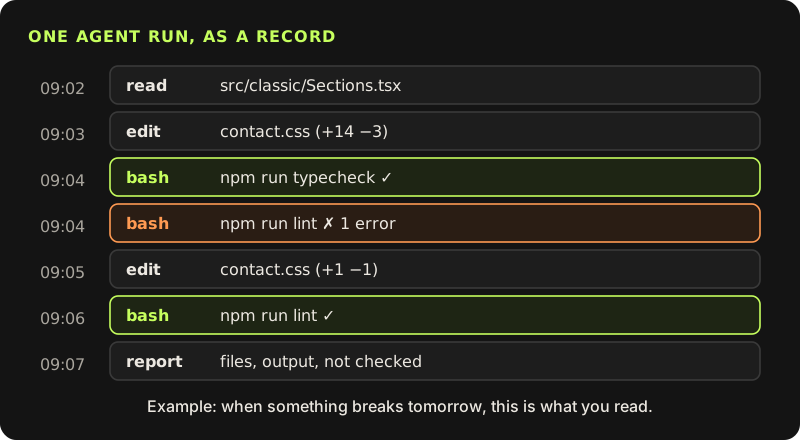
Inside a product, the trace.log line in the loop above is the same idea: tool name, input, duration and whether it failed, per step, per request. Send it to whatever you already use for traces. You cannot fix a loop you cannot see.
Feedback: fix the harness, not just the output
When an agent makes a mistake, correcting that one output is the smallest possible fix. The better fix changes the harness so the next run cannot repeat it quietly, and each layer above gives a concrete place to put it: a line in CLAUDE.md, a deny rule, a branch in the guard script, a check in the Stop hook, or a new case in the eval set.
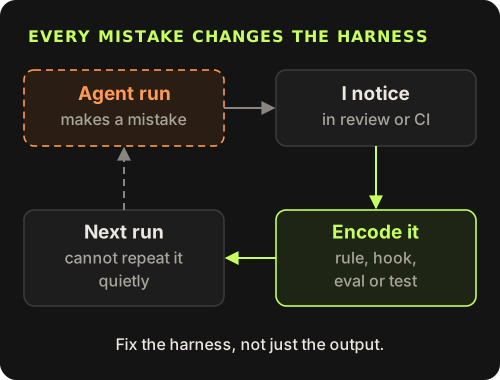
Over a few weeks this compounds. The harness for this site started as one instructions file. It now has naming rules for client work, a bundle budget, a guard hook, a Stop hook, model routing, a memory folder and a handful of skills, and nearly every one of those exists because something went wrong once.
Where to start
Write down the hard rules
A short CLAUDE.md: commands, conventions, and the few things that must never happen.
Make done provable
A Stop hook running typecheck and lint, slower checks in CI, evals for LLM features.
Cut the tools, then set permissions
Narrow, read-only tools by default; allow, ask and deny rules; a PreToolUse guard for what patterns cannot express.
Route by difficulty
Subagents with small models for mechanical work, the large one for decisions.
Keep the records and use them
Query transcripts and traces when something looks off, and turn each mistake into a rule.
None of this makes the model smarter. It makes the system around it predictable, which in my experience is what decides whether an agent is useful at work or just impressive in a demo.