· 6 min read
Running coding agents in parallel without them stepping on each other
One git worktree and one branch per task, work split by files rather than features, and a main session that does every review and merge. How I run several Claude Code agents at once.
Most of this portfolio site was written by Claude Code subagents. Not one long chat, but several agents at once, each with its own job: the blog editor in one, the API validation in another, the diagrams in a third. That only pays off if the agents stay out of each other's way, and in a single checkout they do not.
The fix is old git rather than new AI: one worktree per task. This post covers the setup I settled on, the rules that keep agents apart, and the merge routine that keeps main green.
What goes wrong in one checkout
An agent works by reading files, editing them and running commands, and all three assume it is the only one doing so. Put two agents in one folder and you get three kinds of trouble.
- Edits that cross. Agent A reads
src/App.tsx, agent B rewrites it, then A writes back its own version from memory. B's change is gone and nothing reports an error. - Shared processes. One agent's
npm installswapsnode_modulesunder the other's running build. A test run picks up a half-written file. Both dev servers want port 5173. - Mixed diffs.
git diffshows everybody's changes together, so no agent can tell you cleanly what it did, and you cannot review one task at a time.
The last one is the real cost. Parallel agents are only worth it if you can review their work separately.
One worktree, one branch, one task
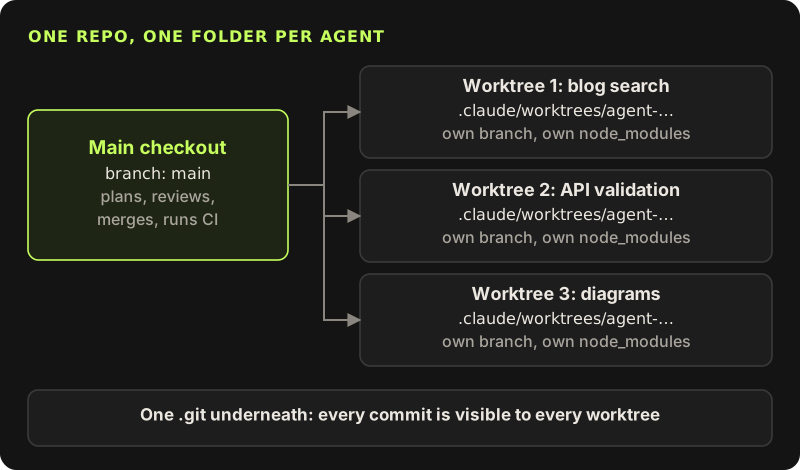
git worktree gives a repository extra working folders. Each has its own checked-out branch and its own files, but they all share one .git store, so a commit made in any of them is visible to all the others straight away. No second clone, and no pushing to share work.
$ git worktree add -b feat/blog-search ../arcade-blog-search main
$ cd ../arcade-blog-search && npm ci
$ npx vite --port 5181 --strictPort
Three details matter. Each worktree needs its own install, because node_modules is not tracked. Each dev server needs its own port, and --strictPort makes Vite fail loudly instead of quietly moving to the next free one, where the agent will not look. And gitignored files such as .env.local do not come along, so copy them in, or the agent will "fix" the missing variables in code.
In Claude Code you rarely type those commands yourself. A subagent can run with worktree isolation (isolation: "worktree" on the Agent tool, or isolation: worktree in a subagent definition), and Claude Code creates a folder under .claude/worktrees/agent-… on a branch named worktree-agent-…. That is where the branches of that name in this repo come from. An interactive session can do the same with claude --worktree <name>, and a .worktreeinclude file lists the gitignored files to copy into each new worktree.
Split the work by files, not by features
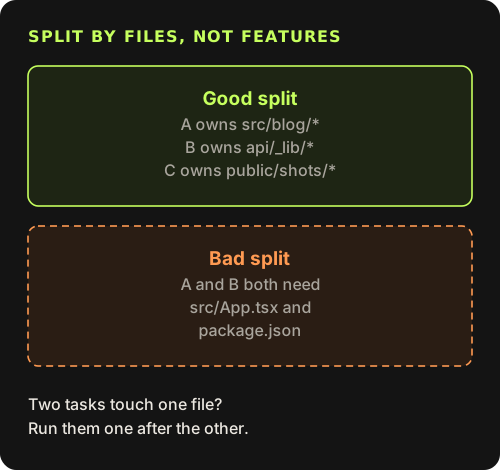
A worktree stops agents from overwriting each other while they work. It does nothing about merging. If two branches both rewrite the router, you get a conflict later instead of a silent loss now. That is better, but it is still work, and the agent that resolves it has context for only one side. So before spawning anything I write down which files each task owns. If two tasks need the same file, they are not parallel tasks: I run them one after the other, or I make the shared change first in the main session and split after that.
For this site that meant splits like "the blog UI owns src/blog/", "the API owns api/_lib/" and "the diagrams own public/shots/". A pair like "add search" and "add tags" sounds independent, but both want the same list component, so it goes in sequence.
The main session plans, reviews and merges
I keep one session, on the strongest model, that does not write feature code. It plans the tasks, spawns the agents, reads what comes back and does every merge. Agents do not merge their own branches and they do not push.
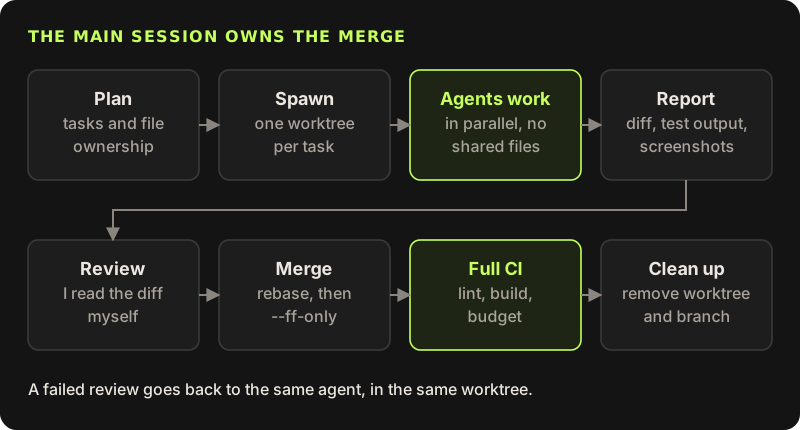
Each agent's brief names the files it owns, the files it must not touch, the commands that must pass before it reports, and what the report must contain. When a review fails, the fix goes back to the same agent in the same worktree, because it still holds the context.
Task: add a search box to the blog list page.
You own: src/blog/BlogList.tsx, src/blog/search.ts, src/blog/blog.css
Do not edit: package.json, package-lock.json, src/App.tsx, CLAUDE.md
Before reporting: npm run lint and npm run typecheck must pass.
Report: files changed, command output, a screenshot of /blog at 390 px wide.
Commit on your branch. Do not merge and do not push.
Shared files have one owner
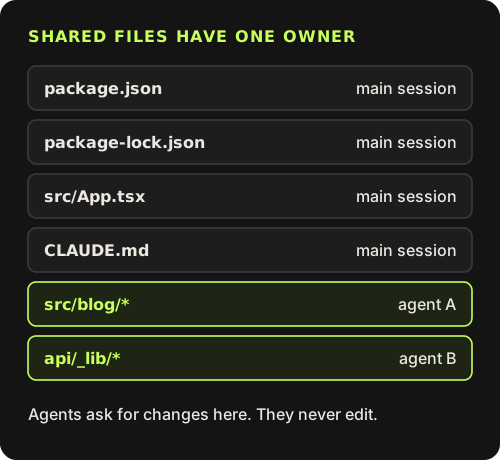
Some files get touched by almost every task: package.json, the lockfile, the router, the instruction file. Those belong to the main session. If an agent needs a new dependency it says so in its report, I add it on main once, and the agent rebases. Two agents each running npm install some-lib produce two lockfile diffs that never merge cleanly, and lockfile conflicts are the most tedious kind there is. The same goes for the instruction file: if an agent thinks a rule is wrong, it says so in the report, and I decide. An agent that edits its own instructions mid-task changes the rules for every agent that starts after it.
Merge one branch at a time
Agents finish in whatever order they finish, and merging everything at once is how a green branch turns red. I merge in sequence, and each branch is rebased on the current main and checked again before it lands.
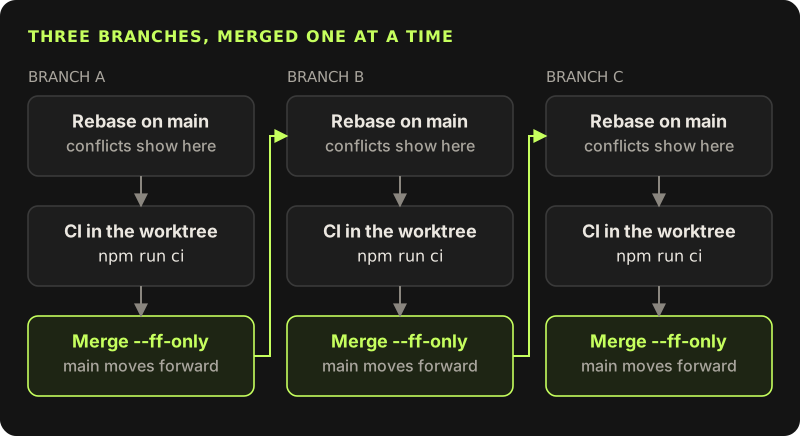
# in the agent's worktree (worktrees share refs, so main is current)
$ git rebase main
$ npm run ci
# back in the main checkout
$ git merge --ff-only feat/blog-search
$ npm run ci
--ff-only refuses to create a merge commit, so if main moved since the rebase, the merge fails and I rebase again. That keeps history linear (this repo has no merge commits at all) and means every commit on main was tested in the order it landed. The second npm run ci on main looks redundant. It is the one run that checks the combination, and on this site it includes the bundle budget, so two branches that are each fine but heavy together fail there, not in production.
Clean up as you go
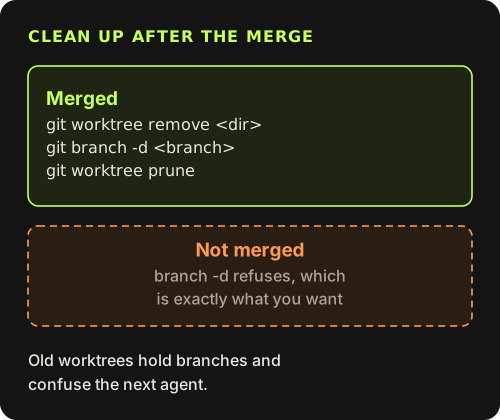
A merged worktree is clutter, and clutter misleads the next agent, which may find a stale copy of a file and trust it. After each merge I remove the folder and the branch. git branch -d refuses to delete a branch that is not merged, which makes it a cheap check: if it complains, some work did not land. Claude Code also sweeps old agent worktrees on a timer, but I would rather know the state now. Before starting the next round of agents, git worktree list should show the main checkout and nothing else, and git branch should show only branches that are still in review.
$ git worktree list
$ git worktree remove ../arcade-blog-search
$ git branch -d feat/blog-search
$ git worktree prune
How many agents at once
Fewer than you would think. The limit is not the machine or the API, it is my review. Every report needs a real read of the diff, and past a few parallel tasks I start skimming, which defeats the point. For me that is three or four. Run as many agents as you can review properly before the first one is left waiting on you.
Write down file ownership first
List the files each task owns. If two tasks share a file, run them in sequence.
One worktree and branch per task
Its own install, its own dev server port, and the gitignored env files copied in.
Keep shared files on main
The lockfile, the router and the instruction files change only in the main session.
Merge one branch at a time
Rebase, run CI in the worktree, merge with
--ff-only, then run CI again onmain.Remove what you merged
git worktree remove,git branch -d,git worktree prune.