· 9 min read
A small MCP server that lets a coding agent read production safely
Production access for a coding agent without handing it production: named queries instead of SQL, a read-only Postgres role, redaction on every value, and auth for local and team use. Built with the official TypeScript MCP SDK.
When a bug only shows up in production, the slow part of fixing it with a coding agent is the human in the middle: copying log lines into the chat, running a query, pasting the result, trimming out customer emails first. The agent is quick at reading evidence. It just is not allowed to fetch any.
The obvious fix, handing the agent a database URL, is the one I will not do. An agent with a connection string can run whatever SQL it decides would help, and "would help" includes UPDATE. What I want is narrower: a few questions it can ask, answers it can read, and nothing it can change. The Model Context Protocol (MCP) fits that shape well.
Below is a small server built with the official TypeScript SDK, @modelcontextprotocol/sdk version 1.32. The code typechecks, and I exercised the tools through the SDK's in-memory client. The tables and views are an example schema, so swap in your own.
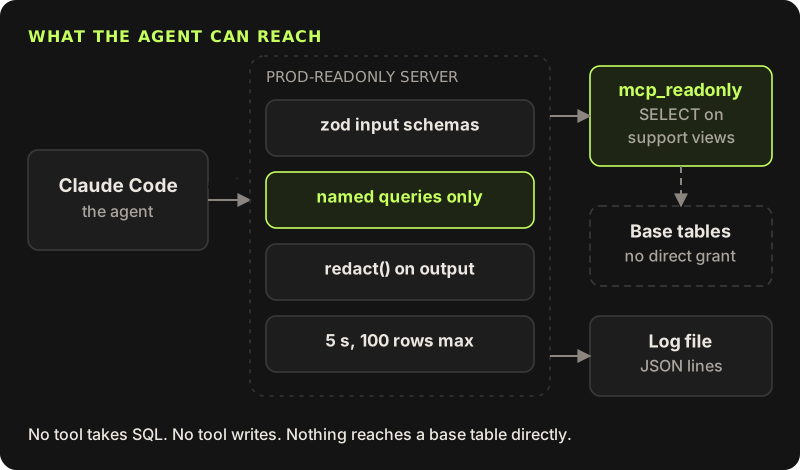
Named tools, not a SQL tool
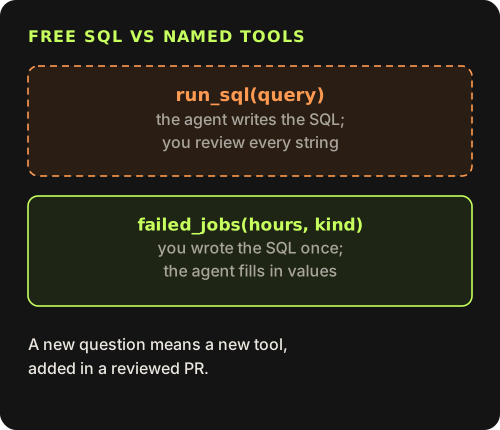
The first decision matters most. A run_sql tool that takes a query string is convenient, and it turns every safety question into "did someone read that string carefully?". Named tools turn that around. I write each query once, with parameters, in a file that goes through review. The agent can only choose which question to ask and fill in the values. A new kind of question means a new tool in a pull request, which is about the right amount of friction for production access.
Each tool declares a zod input schema, and the SDK validates arguments before my handler runs. An orderId of '; DROP TABLE never gets near the database; the agent receives an input validation error that names the pattern it broke.
import { McpServer } from '@modelcontextprotocol/sdk/server/mcp.js'
import { z } from 'zod'
import { readOnly } from './db.js'
import { tailLogs } from './logs.js'
import { redact, redactText } from './redact.js'

const LOG_FILE = process.env.MCP_LOG_FILE ?? '/var/log/app/app.jsonl'
const READ_ONLY = { readOnlyHint: true, destructiveHint: false, openWorldHint: false }

const ok = (data: unknown) => ({ content: [{ type: 'text' as const, text: JSON.stringify(redact(data), null, 2) }] })
const fail = (err: unknown) => ({
  isError: true,
  content: [{ type: 'text' as const, text: redactText(err instanceof Error ? err.message : String(err)) }],
})

export function buildServer() {
  const server = new McpServer({ name: 'prod-readonly', version: '1.0.0' })

  server.registerTool(
    'failed_jobs',
    {
      title: 'Recent failed background jobs',
      description: 'Failed jobs from the last N hours, newest first. Max 100 rows.',
      inputSchema: {
        hours: z.number().int().min(1).max(72).describe('How far back to look'),
        kind: z.enum(['email', 'invoice', 'import', 'webhook']).optional(),
      },
      annotations: READ_ONLY,
    },
    async ({ hours, kind }) => {
      try {
        return ok(await readOnly(
          `SELECT id, kind, attempts, error, failed_at
             FROM support.failed_jobs
            WHERE failed_at > now() - make_interval(hours => $1)
              AND ($2::text IS NULL OR kind = $2)
            ORDER BY failed_at DESC
            LIMIT 100`,
          [hours, kind ?? null],
        ))
      } catch (err) {
        return fail(err)
      }
    },
  )

  server.registerTool(
    'order_status',
    {
      title: 'One order and its status history',
      description: 'Look up a single order by its public id, e.g. ord_8f2k1x.',
      inputSchema: { orderId: z.string().regex(/^ord_[a-z0-9]{6,24}$/) },
      annotations: READ_ONLY,
    },
    async ({ orderId }) => {
      try {
        const order = await readOnly(
          'SELECT public_id, status, total_cents, currency, created_at, updated_at FROM support.orders WHERE public_id = $1',
          [orderId],
        )
        if (!order.length) return ok({ found: false })
        const history = await readOnly(
          'SELECT status, changed_at, source FROM support.order_events WHERE public_id = $1 ORDER BY changed_at',
          [orderId],
        )
        return ok({ found: true, order: order[0], history })
      } catch (err) {
        return fail(err)
      }
    },
  )

  server.registerTool(
    'tail_logs',
    {
      title: 'Recent application logs',
      description: 'Newest matching log lines from production, redacted. Max 200 lines.',
      inputSchema: {
        sinceMinutes: z.number().int().min(1).max(240).default(30),
        level: z.enum(['error', 'warn', 'info']).optional(),
        contains: z.string().max(100).optional().describe('Plain substring, not a regex'),
        limit: z.number().int().min(1).max(200).default(50),
      },
      annotations: READ_ONLY,
    },
    async (args) => {
      try {
        return ok(await tailLogs(LOG_FILE, args))
      } catch (err) {
        return fail(err)
      }
    },
  )

  return server
}
A few things in there are deliberate. annotations marks every tool as read-only and closed-world. Clients can use that to skip confirmation prompts, but it is a hint, not a guarantee; the guarantees come from the layers below. Failures come back as isError: true with a redacted message, so the agent learns that a call failed and can say so, instead of the whole request erroring out. And each query carries its own LIMIT even though the helper caps rows as well.
A role that can only read views
The database user is where read-only becomes real. The server logs in as a role with SELECT on a handful of views in a support schema and no grant on any base table. A view runs with its owner's rights by default, so the role can read through it without being able to read the table behind it. The views also choose the columns, so password hashes and addresses are never in a result in the first place.
CREATE ROLE mcp_readonly LOGIN PASSWORD 'from-your-secret-store';
ALTER ROLE mcp_readonly SET default_transaction_read_only = on;
ALTER ROLE mcp_readonly SET statement_timeout = '5s';

CREATE SCHEMA support;
CREATE VIEW support.failed_jobs AS
  SELECT id, kind, attempts, left(error, 500) AS error, failed_at
    FROM jobs WHERE status = 'failed';
CREATE VIEW support.orders AS
  SELECT public_id, status, total_cents, currency, created_at, updated_at
    FROM orders;
-- support.order_events follows the same pattern.

GRANT USAGE ON SCHEMA support TO mcp_readonly;
GRANT SELECT ON ALL TABLES IN SCHEMA support TO mcp_readonly;
Point it at a read replica if you have one. Then even a slow query that gets past every other layer cannot hurt the primary.
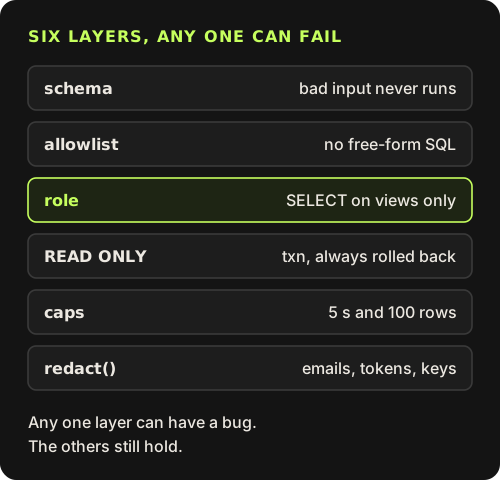
On top of the role, the server runs every query inside a read-only transaction that is always rolled back, with a statement timeout and a row cap. That repeats the role settings on purpose. Each layer can be wrong on its own: a migration can grant too much, a view can gain a column, someone can swap the connection string for one with more rights. With several independent layers, one mistake stays a mistake and does not become an incident. It also means I can reason about each layer alone when I review a change to it, without holding the whole system in my head.
import pg from 'pg'

const MAX_ROWS = 100

// MCP_DATABASE_URL logs in as mcp_readonly, a role that can only SELECT from a few views.
const pool = new pg.Pool({
  connectionString: process.env.MCP_DATABASE_URL,
  max: 2,
  statement_timeout: 5_000,
  application_name: 'mcp-readonly',
})

// Every query runs inside a READ ONLY transaction that is always rolled back.
export async function readOnly(sql: string, params: unknown[]): Promise<Record<string, unknown>[]> {
  const client = await pool.connect()
  try {
    await client.query('BEGIN TRANSACTION READ ONLY')
    const res = await client.query(sql, params)
    return res.rows.slice(0, MAX_ROWS)
  } finally {
    await client.query('ROLLBACK').catch(() => {})
    client.release()
  }
}
Redact everything on the way out
Logs are worse than tables. A view picks its columns; a log line holds whatever a developer interpolated into it years ago. So every value the server returns, rows, log lines and error messages alike, passes through one function. It drops keys that look like secrets, then replaces text that looks like an email, a bearer token, a JWT, an API key, a card number or a connection string.
![A row or log line has secret-looking keys dropped, then emails, JWTs, bearer tokens and card-like numbers replaced, then goes to the agent as JSON; example: jo@example.com becomes [email] and Bearer abc.def becomes Bearer [token]](/shots/post-ai-mcp/redact.svg)
// Applied to every value before it leaves the server: rows, log lines, error messages.
const DROP_KEYS = /^(password.*|.*_hash|.*token.*|.*secret.*|api_key|authorization|cookie)$/i

const PATTERNS: [RegExp, string][] = [
  [/[A-Z0-9._%+-]+@[A-Z0-9.-]+\.[A-Z]{2,}/gi, '[email]'],
  [/\bBearer\s+[A-Za-z0-9._~+/-]+=*/gi, 'Bearer [token]'],
  [/\beyJ[A-Za-z0-9_-]+\.[A-Za-z0-9_-]+\.[A-Za-z0-9_-]+/g, '[jwt]'],
  [/\b(?:sk|pk|rk)_(?:live|test)_[A-Za-z0-9]{8,}/g, '[api-key]'],
  [/\b(?:\d[ -]?){13,19}\b/g, '[card-like]'],
  [/(postgres(?:ql)?:\/\/)[^\s"']+/gi, '$1[redacted]'],
]

export function redactText(s: string): string {
  return PATTERNS.reduce((out, [re, sub]) => out.replace(re, sub), s)
}

export function redact(value: unknown): unknown {
  if (typeof value === 'string') return redactText(value)
  if (Array.isArray(value)) return value.map(redact)
  if (value instanceof Date) return value.toISOString()
  if (value && typeof value === 'object') {
    return Object.fromEntries(
      Object.entries(value)
        .filter(([k]) => !DROP_KEYS.test(k))
        .map(([k, v]) => [k, redact(v)]),
    )
  }
  return value
}
Regex redaction is a net, not a wall. It will miss a secret in a format it does not know, and now and then it will mask an order number that happens to look like a card. I accept the false positives. For the misses, the real fix is upstream: stop logging the value. I treat every catch by the redactor as a bug report against the line of code that logged it.
The log tool reads a JSON-lines file written by the log drain. It filters by time, level and a plain substring (not a regex, so nobody can send a pattern that hangs the server) and keeps only the newest matches.
Auth for local and remote use
For one developer, stdio is the simplest transport. Claude Code starts the server as a child process from the project's .mcp.json, and the database URL comes from the developer's environment rather than from the file:
{
  "mcpServers": {
    "prod-readonly": {
      "command": "node",
      "args": ["tools/mcp-readonly/dist/stdio.js"],
      "env": {
        "MCP_DATABASE_URL": "${MCP_DATABASE_URL}",
        "MCP_LOG_FILE": "${MCP_LOG_FILE:-/var/log/app/app.jsonl}"
      }
    }
  }
}
Be honest about what that protects. The agent also has a shell, and the variable lives in the same environment, so a curious agent could print it. That is exactly why the role matters more than the secret: the worst anyone can do with that URL is read a few views.
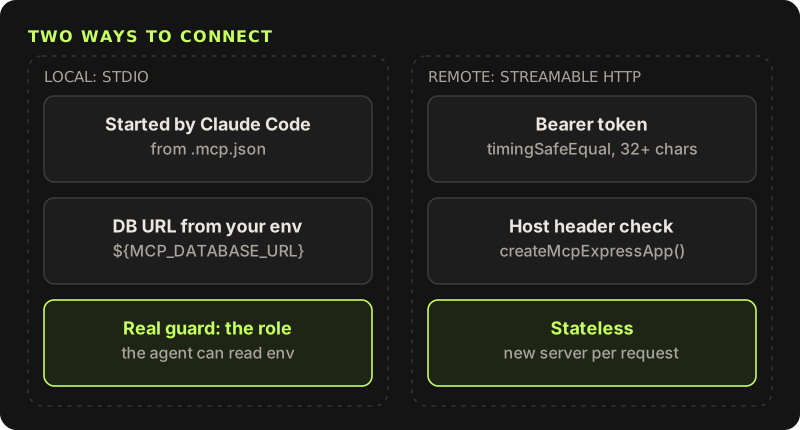
For a team, the same tools can sit behind Streamable HTTP. The SDK's createMcpExpressApp() validates the Host header for localhost servers, which blocks DNS rebinding, and I put a bearer token check in front. The server is stateless: a fresh McpServer and transport for every request, so nothing is shared between callers.
import { timingSafeEqual } from 'node:crypto'
import { createMcpExpressApp } from '@modelcontextprotocol/sdk/server/express.js'
import { StreamableHTTPServerTransport } from '@modelcontextprotocol/sdk/server/streamableHttp.js'
import { buildServer } from './tools.js'

const TOKEN = Buffer.from(process.env.MCP_TOKEN ?? '')
if (TOKEN.length < 32) throw new Error('MCP_TOKEN must be at least 32 characters')

function authorized(header: string | undefined) {
  const given = Buffer.from(header?.replace(/^Bearer /, '') ?? '')
  return given.length === TOKEN.length && timingSafeEqual(given, TOKEN)
}

const app = createMcpExpressApp() // validates the Host header for localhost

app.post('/mcp', async (req, res) => {
  if (!authorized(req.headers.authorization)) {
    res.status(401).json({ error: 'unauthorized' })
    return
  }
  // Stateless: a fresh server and transport per request, nothing shared between callers.
  const server = buildServer()
  const transport = new StreamableHTTPServerTransport({ sessionIdGenerator: undefined })
  res.on('close', () => {
    transport.close()
    server.close()
  })
  await server.connect(transport)
  await transport.handleRequest(req, res, req.body)
})

app.listen(3333, '127.0.0.1')
Each developer registers it with their own token: claude mcp add --transport http prod-readonly http://127.0.0.1:3333/mcp --header "Authorization: Bearer $MCP_TOKEN". As written it only listens on localhost. For a shared deployment, run it behind your VPN or SSO proxy and pass allowedHosts to createMcpExpressApp(). A static token is the minimum, not the goal.
What it looks like in use
With the server connected, "why did the invoice emails fail last night?" becomes a failed_jobs call with hours: 12 and kind: "email", plus a tail_logs call filtered to errors, both answered in one turn with addresses already masked. The agent never has a connection string in its context, never writes SQL, and cannot change a row. That last property is what makes it reasonable to leave the server connected all day instead of only while someone watches.
Write named tools
One tool per question, with a zod schema and the SQL written by you. No tool that accepts a query.
Create a role that reads views
SELECTon a few views only,default_transaction_read_only, a statement timeout, ideally on a replica.Wrap every query
A read-only transaction that is always rolled back, plus a row cap in code.
Redact on the way out
Drop secret-looking keys, mask emails, tokens and keys, and fix the code that logged them.
Pick the transport
stdio for one developer. Streamable HTTP with a token, Host checks and a VPN or proxy for a team.