· 7 min read
Agent instructions that actually change behaviour
What belongs in CLAUDE.md or AGENTS.md, what belongs in a skill and what has to be a hook. Plus the kinds of rule agents ignore, and how I test that a rule works before I trust it.
My global instruction file for Claude Code has a five-line rule about which model a subagent should run on. It changes how every session spends money, and a short test shows that it does. Most instruction files I read are the opposite: long lists of sensible advice with no visible effect on what the agent actually does.
The difference is not clever wording. It is whether each rule sits in a place where it can work, whether it has a trigger, and whether anyone tested it. This is how I decide all three.
Four places a rule can live
Claude Code reads CLAUDE.md (or a repository's AGENTS.md) at the start of every session. Skills are folders with a SKILL.md file that load only when a task matches their description. Hooks are scripts the harness runs at fixed points, such as before a tool call, and the model does not get a vote on whether they run. CI runs after all of that, on every push.
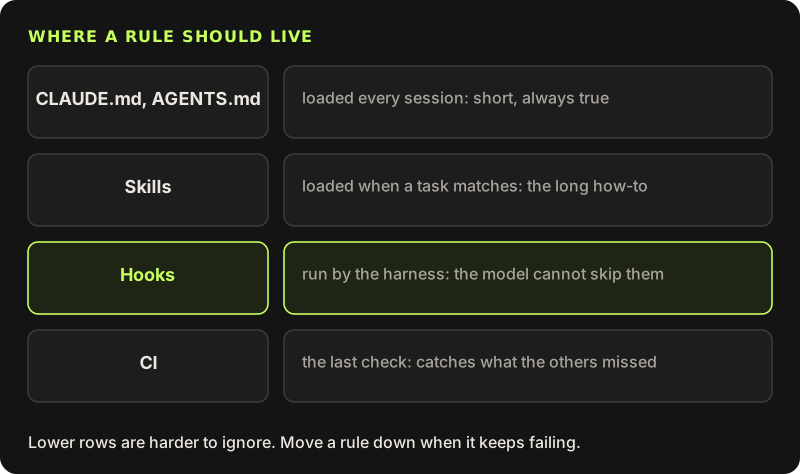
The documentation is frank about the first layer: CLAUDE.md is context, not enforced configuration. The model reads it and usually follows it. "Usually" is fine for style and preferences. It is not fine for "never push to main" or "never print the production database URL". Those belong lower down.
What goes in CLAUDE.md
Things that are true in every session and short enough to read in every session: the commands to build and test, where things live, conventions the code does not make obvious, and the few rules that apply to every task. Anthropic's docs suggest keeping each file under 200 lines; I aim for well under half that. Every line costs context in every session and competes with every other line for attention.
If more than one kind of agent works in the repository, AGENTS.md is the shared name that several tools read, and Claude Code can read it in place of CLAUDE.md. I keep one file rather than two copies that drift apart. Personal preferences that should follow me across every project, like the model rule below, go in the global file in my home directory instead of in any repository.
This is the model rule from my global file, exactly as it is:
# Subagent models (cost)
When work goes to subagents, always set the `model` on every Agent call by how hard the task is:
- `haiku`: copy-only edits, mechanical changes, screenshots, data gathering, simple checks.
- `sonnet`: normal build and fix work (UI, small logic, tests).
- bigger model (inherit/opus): only complex work, such as tricky architecture, security or billing logic, hard merges and deep reviews.
The main session plans, reviews, merges and runs the full tests.
What agents skip
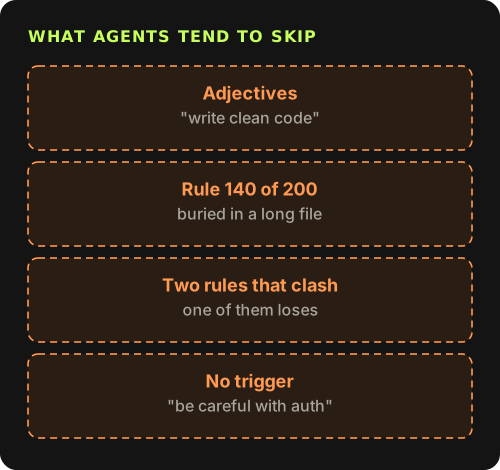
The same kinds of rule fail again and again. Adjectives without a check ("write clean, maintainable code") give the model nothing to do differently, because it already believes that is what it does. Rules deep in a long file lose to the code in front of the model. Two rules that disagree, like "keep changes minimal" and "fix any issues you notice", get settled in whichever direction the task leans. And a rule with no trigger, like "be careful with auth", never fires, because nothing tells the agent that this moment is the auth moment.
A rule has a trigger, an action and a reason
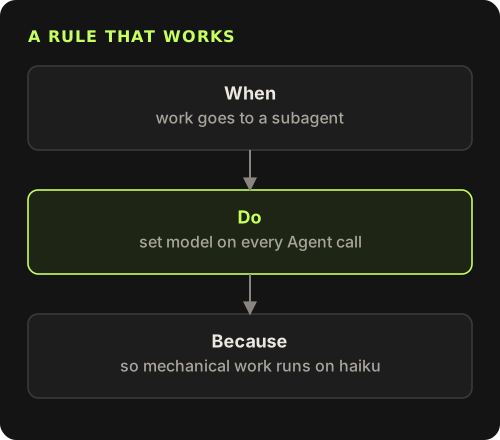
The rules that work read like small if-statements. When something specific happens, do one concrete thing, because of a reason the agent can use on cases the rule did not list. The model rule has all three: the trigger is work going to a subagent, the action is setting model on every Agent call, and the reason is cost, with examples for each tier. The reason matters more than it looks. Without it, an agent meeting an odd case has to guess; with it, it can work out what I wanted.
Negative rules work better with a replacement. "Do not use any" leaves the agent stuck when a type gets hard. "Do not use any; use unknown and narrow it" gives it somewhere to go.
Skills for the long how-to
Some knowledge is long and only sometimes needed: how to draw a diagram in the house style, how to cut a release, how the seed script expects a post to look. In CLAUDE.md it would cost context in every unrelated session. A skill holds it instead. Only the name and description are in context up front, and the body loads when a task matches.
---
name: blog-diagram
description: Draws an SVG diagram for a blog post in the site's dark style. Use when a post needs a flowchart, an architecture picture or a comparison.
---
Write a hand-made SVG to public/shots/<post-dir>/<name>.svg.
- Palette: background #141414, boxes #1d1d1d, lines #3a3a3a, accent #c6ff5e, warning #ff9a52.
- System fonts only. Text 16px or larger in viewBox units.
- Side images: viewBox about 500 wide. Full width: up to 800.
- Render a PNG at display width (420 or 720 px) and look at it before using the SVG.
The description is the trigger, so write it like a CLAUDE.md rule: what the skill does, then "use when" with the situations that should load it. A vague description means the skill never loads, and from the outside that looks exactly like a skill that does not work.
Hooks for things that must not happen
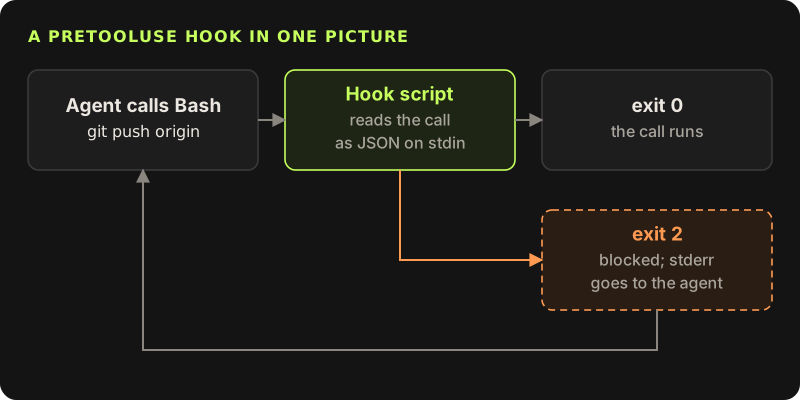
A hook is a script the harness runs at a fixed point. A PreToolUse hook on Bash receives each command as JSON on stdin before it runs. Exit code 0 lets it run. Exit code 2 blocks it and hands whatever the script wrote to stderr back to the agent. The model cannot argue its way past that, because the model is not the one running it.
{
  "hooks": {
    "PreToolUse": [
      {
        "matcher": "Bash",
        "hooks": [
          { "type": "command", "command": "${CLAUDE_PROJECT_DIR}/.claude/hooks/no-push.sh" }
        ]
      }
    ]
  }
}#!/usr/bin/env bash
# Blocks git push from agents. The main session pushes after review.
cmd=$(jq -r '.tool_input.command // empty')
if printf '%s' "$cmd" | grep -Eq '(^|[;&|[:space:]])git[[:space:]]+push'; then
echo "Blocked: agents do not push. Commit on your branch and report back." >&2
exit 2
fi
exit 0The stderr message is part of the design. A bare refusal makes the agent try variations of the same command. A refusal that says what to do instead ends the attempt. Be clear about what this hook is, too: a guard rail against mistakes, not a security boundary. A command could hide the push inside a script file. Anything that has to hold against a determined command belongs in permissions, or in credentials the agent simply does not have.
Test a rule like code
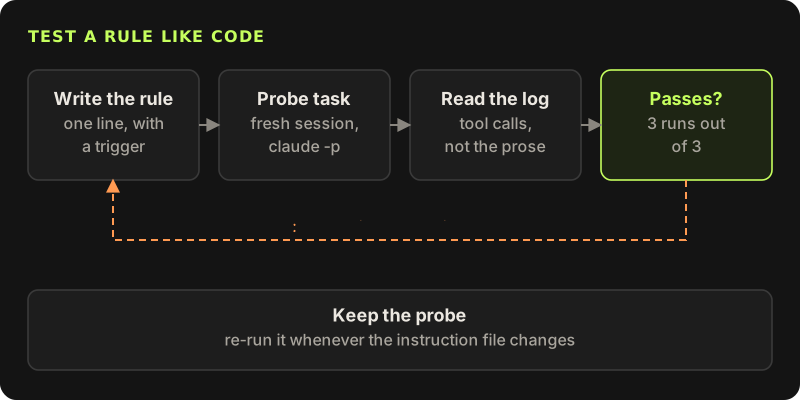
I do not trust a rule until I have watched it change behaviour. The test is a probe: a small task that should trigger the rule, run in a fresh headless session, and checked from the tool calls in the log rather than from the agent's own account of what it did.
$ claude -p "Rename the CSS class .blog-card to .post-card everywhere. Use a subagent." \
    --output-format stream-json --verbose > run.jsonl
$ jq -c 'select(.type == "assistant") | .message.content[]
    | select(.type == "tool_use" and .name == "Agent") | .input.model' run.jsonl
"haiku"
A pure rename should go to haiku. If the probe prints null, the agent started a subagent without choosing a model, and the rule failed. (Older Claude Code versions named the tool Task, so adjust the filter if yours does.) I run each probe three times, because one pass can be luck. If a rule still fails after a rewrite, it is telling me it belongs lower in the stack: a hook, a subagent definition with model: in its frontmatter, or a CI check.
Probes also catch regressions. When I add a rule I re-run the old probes, because a new line can quietly weaken an old one.
Keeping the files short
- Delete rules the agent follows anyway. If a fresh session already does it without the line, the line is noise.
- Move anything long and occasional into a skill, and anything that only applies to some paths into a scoped rule file under
.claude/rules/. - Move anything that must never happen into a hook or a permission.
- Prefer one concrete example to three sentences of description.
- Re-read the file when you change models. A rule written to correct an older model's habit can make a newer one worse.
The test for every line is the same: can I show a probe where removing it changes what the agent does? If I cannot, the line goes.
Claude Code hooks referenceEvery hook event, its JSON input and what exit code 2 does for each one.code.claude.com/docs/en/hooks