· 10 min read
Nemotron 3.5 Parse vs LightOnOCR 3 vs Docling on hard invoices: what the numbers mean
A reel tested three document parsers on a scanned GST invoice and a Hindi one. LightOnOCR 3 read almost everything, Nemotron lost a column, and Docling could not read Hindi. Here is why, and what to do about it.
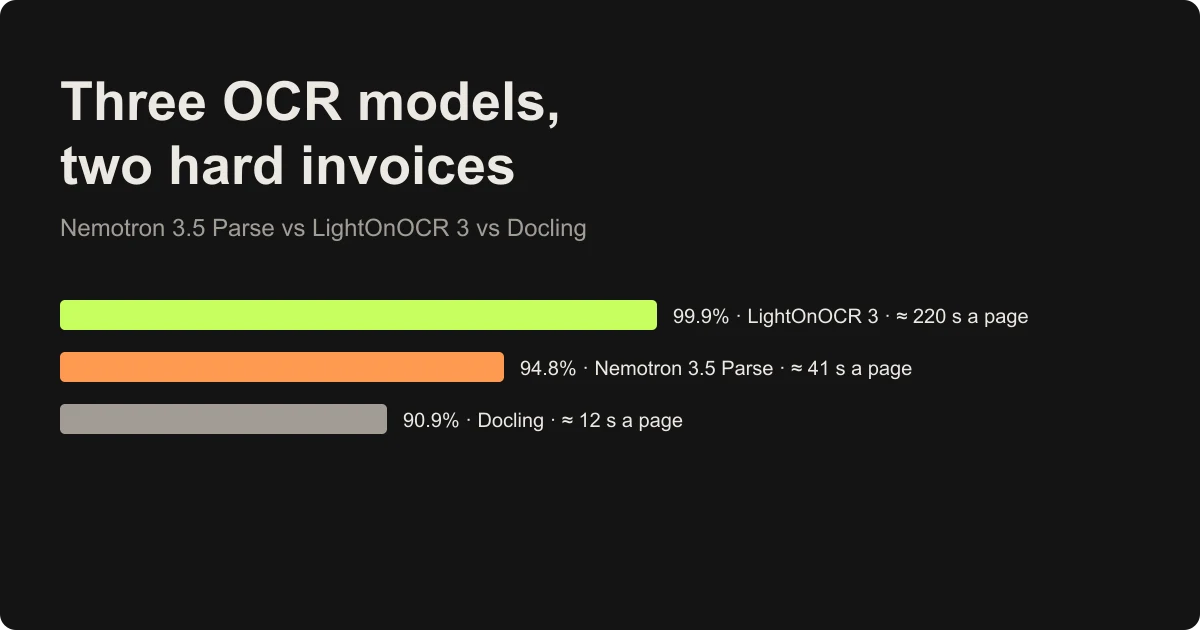
NVIDIA released a small document parser in September, Nemotron 3.5 Parse: 631 million parameters, free to download, and top of its own ParseBench table. A few weeks later Laxmi Kant of KGP Talkie Hindi put it through a test I liked: two deliberately hard scanned invoices, one GST invoice and one in Hindi, run through Nemotron, LightOnOCR 3 and Docling on a MacBook Pro M5 Max.
The result was not what NVIDIA's table would predict. LightOnOCR 3 read almost everything. Nemotron dropped a column and the grand total. Docling turned Hindi into nonsense.
The reel is under three minutes, so it shows the scores and not much of the why. I spent an evening on the why: the model cards, Docling's source, and a small reproduction of the Hindi failure on my own Mac. This post covers what the numbers mean and what I would do if I were building invoice extraction today.
The test in the reel
- Documents: a two-page GST invoice and a Hindi invoice, printed, scanned, tilted, noisy and folded.
- What was checked: 86 key fields (invoice numbers, tax IDs, totals, bank details) plus every table cell, 689 checks in all.
- The strict rule: a cell only counts if the value lands in the right row. Reading 12,510.36 correctly but putting it on the carton row instead of the HDPE jar row is a miss.
- Hardware: MacBook Pro M5 Max, every page timed.
That row rule matters more than it sounds. Most OCR scores count characters. An accounts team cares whether the amount sits next to the right line item, because that is what gets posted to the ledger.
The three results, and what went wrong in each
Docling: fast, and blind to Devanagari
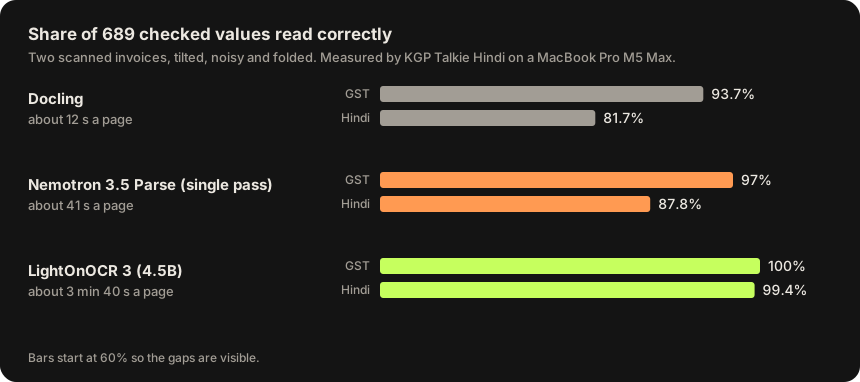
Docling took about 12 seconds a page and scored 93.7% on the GST invoice and 81.7% on the Hindi one. The reel shows one line that explains most of the gap: the printed text निर्माण / Mfg came out as fARFUT / Mfg. The English half survived. The Hindi half was read as if it were Latin letters.
That is not really Docling's layout model failing. Docling hands the text recognition to a separate OCR engine, and the default choice depends on your machine. Here is the selection order from OcrAutoOptions in Docling's current source:
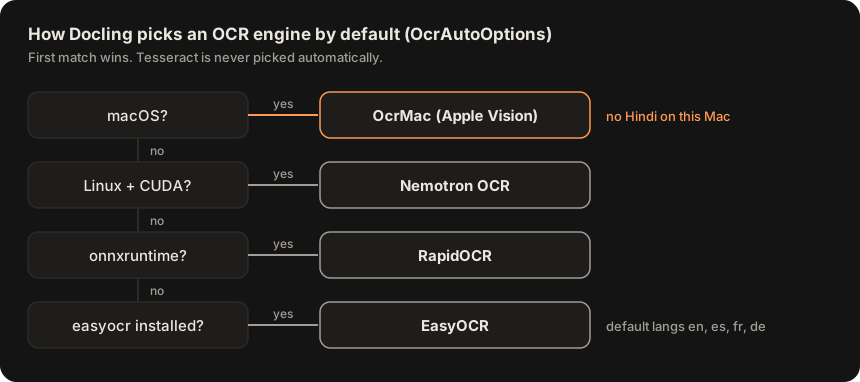
On a Mac the first match is OcrMac, which is Apple's Vision framework. So I asked Vision on my own machine (macOS 15.7) which languages its accurate recognizer supports:
import Vision
let r = VNRecognizeTextRequest()
r.recognitionLevel = .accurate
print(try r.supportedRecognitionLanguages().joined(separator: " "))en-US fr-FR it-IT de-DE es-ES pt-BR zh-Hans zh-Hant yue-Hans yue-Hant ko-KR ja-JP ru-RU uk-UA th-TH vi-VT ar-SA ars-SANo Hindi. To see what that does to an invoice, I rendered three lines in a Devanagari font, including the same grand total that appears in the reel, and ran Vision on them two ways: with Docling's OcrMac default languages, and with automatic language detection.
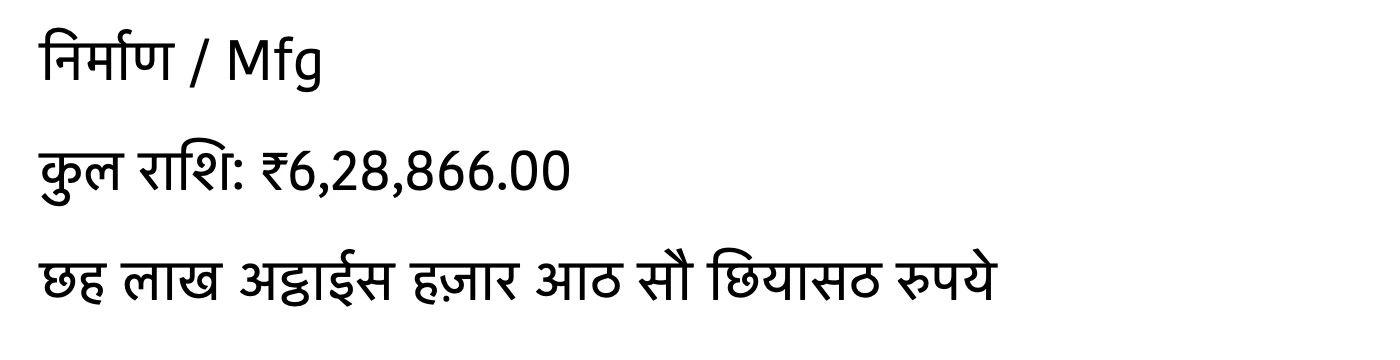
langs=en-US,es-ES,fr-FR,de-DE
   Mg
   del T: 76,28,866.00
langs=auto
   Mg
   엽의 시 생6,28,866.00
This is a clean image, with no tilt, no fold and no scanner noise, and it still fails badly. The whole amount-in-words line is gone. Worse, the rupee sign was read as a 7, so ₹6,28,866.00 became 76,28,866.00. That is a number that parses fine, passes a type check and is wrong by 70 lakh. It is the kind of error that reaches a ledger.
The fix is to choose an engine that has a Devanagari model instead of taking the default. EasyOCR has one. I wrapped the same image in a PDF and ran this with Docling 2.150.1:
from docling.datamodel.base_models import InputFormat
from docling.datamodel.pipeline_options import EasyOcrOptions, OcrMode, PdfPipelineOptions
from docling.document_converter import DocumentConverter, PdfFormatOption

opts = PdfPipelineOptions(
    do_ocr=True,
    # Scans have no text layer, so OCR the whole page. "hi" pulls in EasyOCR's Devanagari model.
    # The default threshold (0.5) dropped two of my three lines; 0.1 kept them.
    ocr_options=EasyOcrOptions(lang=["hi", "en"], mode=OcrMode.FULL_PAGE, confidence_threshold=0.1),
)
converter = DocumentConverter(format_options={InputFormat.PDF: PdfFormatOption(pipeline_options=opts)})
print(converter.convert("hindi.pdf").document.export_to_markdown())निर्माण Mfg
- कुल रााशिः २6,28,866.00
छह लाख अट्ठाईस हज़ार आठ सौ छियासठ रुपयेMuch better: the Hindi words are all there, including the amount in words. But look at the total again. The rupee sign came back as २, the Devanagari digit two. My first run, with Docling's default confidence threshold of 0.5, also dropped the total line and the amount in words entirely, because EasyOCR scored the total line at only 0.22.
That २ is a trap in Python specifically. Decimal accepts any Unicode digit, so strip the commas and you get a clean, wrong number:
>>> from decimal import Decimal
>>> Decimal("२628866.00")
Decimal('2628866.00')
So with the default engine the total is wrong by 70 lakh, and with the better engine it is wrong by 20 lakh. Neither raises an error. That is why the last section of this post is about checks, not models.
Nemotron 3.5 Parse: one pass, and a column goes missing
Nemotron took about 41 seconds a page and scored 97% on GST and 87.8% on Hindi. The misses had a pattern. On page 2 of the GST invoice, items 18 to 28 each lost one number, the last column (Total ₹), and the grand total of ₹6,28,866.00 and the bank details (IFSC, branch, UPI) were missed too.
A whole column dropping out of a long table is a table-structure problem rather than a reading problem, and NVIDIA built a specific answer to it. The model card describes three parsing modes:
- Single pass: parse the whole page once.
- Double pass: use the first result to find tables and charts, parse those crops again at higher detail, and merge the refinements back.
- Triple pass: also run a separate layout detector at the same time, and refine the union of both sets of table and chart regions, including any that one of them missed.
The reel is fair about this: it says Nemotron ran in one pass, while NVIDIA's headline score uses three. That difference is bigger than it looks. Here are the published ParseBench numbers from NVIDIA's own card:
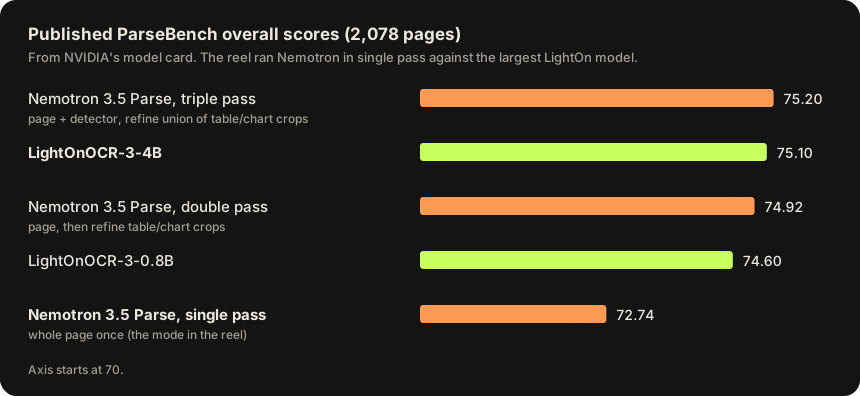
On NVIDIA's own benchmark, single-pass Nemotron (72.74) is behind even the smallest LightOnOCR 3 model (74.60). The reel compared it with LightOn's largest model. At triple pass the two are tied, 75.20 against 75.10. So the reel's result and NVIDIA's table do not contradict each other. They measured different modes.
I have not run the double pass on these invoices, so I can't say it would recover the missing column. But a column lost inside a long table is the exact case the table-crop refinement exists for, and it is the first thing I would try.
LightOnOCR 3: almost perfect, and slow on a laptop
LightOnOCR 3 scored 100% on the GST invoice and 99.4% on the Hindi one: 689 checks, one miss. The miss was in the Hindi amount in words, where हज़ार सैंतीस came back with two words wrong. It took about 3 minutes 40 seconds a page.
The reel calls it a 4.5B model, which matches lightonai/LightOnOCR-3-4B: the Hugging Face API reports 4,539,265,536 parameters, about seven times Nemotron's 631 million. It is built on the Qwen3.5 vision-language architecture, it is Apache-2.0, and it has two modes, an empty prompt for plain transcription and a grounding prompt that adds a label and bounding box to each block.
Why the speeds look so different
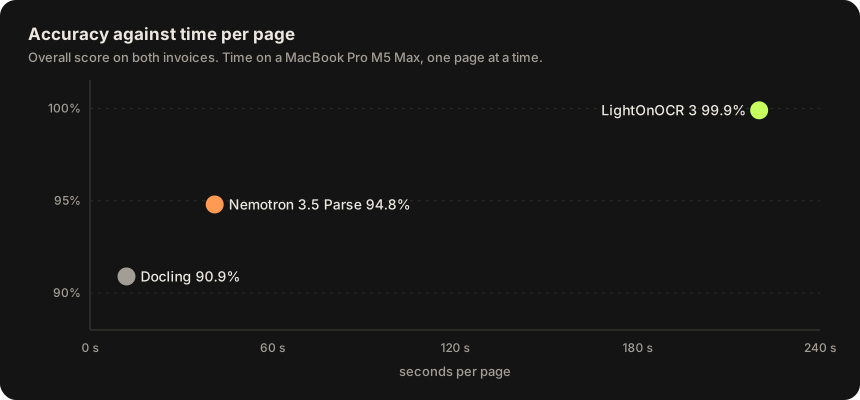
The laptop timings tell you more about Apple silicon than about the models. Both model cards are written around NVIDIA GPUs. Nemotron's Transformers example calls .to("cuda"), and its fast path is vLLM with a small 89.3M-parameter DFlash2 drafter for speculative decoding. NVIDIA measured 18.57 pages per second in single pass on one H200, against 2.76 for LightOnOCR-3-4B in the same table.
So on GPU servers the gap goes the same way, Nemotron is several times faster, but nobody should expect 220 seconds a page from LightOn in production. That is why the reel's closing question, running all three on an RTX 5090, is the one I would want answered too.
What I would do with this
The lesson I take is not "use LightOn". It is that every one of these tools fails in a way that looks like a real number. A dropped total, a ₹ read as 7 or as २, a value on the wrong row. You catch those by checking the invoice against itself, which an Indian GST invoice makes easy because it is full of arithmetic.
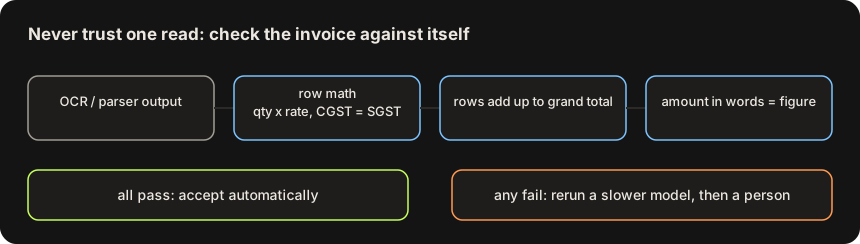
Here is the core of the check I would put after any of these parsers. It uses Decimal so paise do not drift, rejects any digit that is not ASCII, and treats a missing cell as a failure instead of a zero:
from decimal import Decimal, InvalidOperation

def money(s):
    """'₹6,28,866.00' or '6,28,866' -> Decimal. None when it is not a clean number."""
    if s is None:
        return None
    t = str(s).replace("₹", "").replace(",", "").replace("Rs.", "").strip()
    # Decimal("२6") is 26: Python accepts any Unicode digit. OCR output must be ASCII or rejected.
    if not t or any(ch not in "0123456789.-" for ch in t):
        return None
    try:
        return Decimal(t)
    except InvalidOperation:
        return None

def check(inv, tol=Decimal("0.05")):
    problems = []
    for r in inv["rows"]:
        qty, rate = money(r.get("qty")), money(r.get("rate"))
        taxable, cgst, sgst, total = (money(r.get(k)) for k in ("taxable", "cgst", "sgst", "total"))
        if None in (qty, rate, taxable, cgst, sgst, total):
            problems.append(f"row {r['sr']}: missing or unreadable cell")
            continue
        if abs(qty * rate - taxable) > tol:
            problems.append(f"row {r['sr']}: qty x rate = {qty * rate}, taxable says {taxable}")
        if abs(cgst - sgst) > tol:
            problems.append(f"row {r['sr']}: CGST {cgst} != SGST {sgst}")
        if abs(taxable + cgst + sgst - total) > tol:
            problems.append(f"row {r['sr']}: taxable + taxes = {taxable + cgst + sgst}, total says {total}")
    grand = money(inv.get("grand_total"))
    if grand is None:
        problems.append("grand total missing or unreadable")
    else:
        rows_sum = sum((money(r.get("total")) or Decimal(0)) for r in inv["rows"])
        if abs(rows_sum - grand) > tol:
            problems.append(f"rows add up to {rows_sum}, grand total says {grand}")
    return problems
I tested it on a clean two-row invoice and on the four failure shapes from this post:
clean: ok
dropped cell: ['row 2: missing or unreadable cell']
₹ read as 7: ['rows add up to 26644.40, grand total says 726644.40']
no grand total: ['grand total missing or unreadable']
₹ read as २: ['grand total missing or unreadable']
With that in place, the speed table starts to matter more than the accuracy table. Run the fast parser first, Nemotron in double pass or Docling with the right OCR engine, and only send pages that fail the checks to LightOnOCR 3. If most of your invoices are clean, you get close to LightOn's accuracy at a fraction of its cost per page. Add a check that the amount in words matches the figure for Hindi invoices, since that is where even LightOn slipped.
How far to trust these numbers
- Two invoices. 689 checks is a lot of cells, but it is two documents made by one person. It shows how each tool fails. It does not rank them in general.
- One Nemotron mode. Single pass is the fastest and weakest mode. Double and triple pass were not tested.
- A Mac, not a GPU server. The timings are real for that laptop and say little about throughput in production.
- My reproduction is small. I verified the Docling and Apple Vision behaviour myself. I did not rerun Nemotron or LightOnOCR on the invoices.
If your documents are Indian invoices, the cheapest thing you can do is what the reel did: make ten ugly scans of your own, write down the right answers, and score every tool on cells in the right row. It takes an afternoon and it will tell you more than any leaderboard.
Frequently asked questions
Is Nemotron 3.5 Parse better than LightOnOCR 3?
On NVIDIA's published ParseBench, triple-pass Nemotron scores 75.20 and LightOnOCR-3-4B scores 75.10, so they are effectively tied, and Nemotron is several times faster on a GPU. In single pass Nemotron drops to 72.74. In the KGP Talkie Hindi invoice test, single-pass Nemotron scored 94.8% and LightOnOCR 3 scored 99.9%.
Why can't Docling read Hindi?
Docling sends text recognition to a separate OCR engine, and on macOS its automatic choice is Apple Vision. On macOS 15.7, Vision's accurate recognizer lists 18 languages and Hindi is not one of them. Configure Docling with an engine that has a Devanagari model, such as EasyOCR with lang=["hi", "en"], and still validate the numbers: in my test it read the rupee sign as the Devanagari digit २.
How big is Nemotron 3.5 Parse?
It has 631 million parameters, with an optional 89.3M-parameter DFlash2 drafter for faster decoding in vLLM. It is released under the OpenMDW 1.1 license. LightOnOCR-3-4B has about 4.54 billion parameters and is Apache-2.0.
Which OCR model should I use for GST invoices?
Use a fast parser first and check the result with the invoice's own arithmetic: quantity times rate, CGST equal to SGST, rows adding up to the grand total. Send only the pages that fail to a slower, more accurate model like LightOnOCR 3, and then to a person.