· 6 min read
SEO for a React SPA without Next.js, and without giving up the 3D homepage
My portfolio opens on a Three.js scene, which a crawler sees as an empty div. Here is how build-time prerendering, a server-rendered blog on Vercel functions and JSON-LD got it to a Lighthouse SEO score of 100.

This site opens on a small 3D room with an arcade cabinet in it. It is a Vite and React single-page app, and the 3D part loads behind a boot screen. That is great for a visitor and terrible for a search engine. The HTML a crawler receives is a <div id="root"></div> and a script tag.
The usual advice is "move to Next.js". I did not want to: the app is small, the 3D scene is the whole point, and a framework migration to get some HTML into a response felt out of proportion. This post shows what I did instead. It applies to any Vite or Create React App project that needs to be found.
What a crawler actually needs
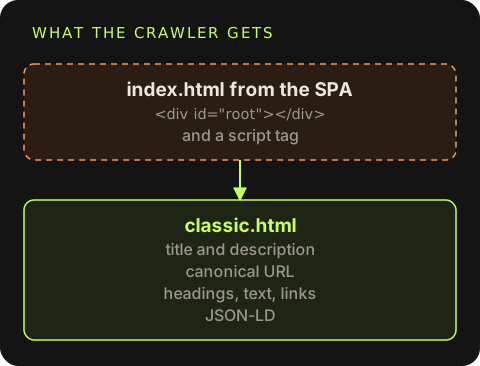
Search engines can run JavaScript, but rendering is deferred and not guaranteed, and other consumers (link previews in chat apps, social cards, smaller engines) usually do not run it at all. To be safe, a page that should rank needs in its first HTML response:
- A unique
<title>and meta description. - A canonical URL, so
/classicand/classic/and?ref=xcount as one page. - The real content as text: headings, paragraphs, links.
- Structured data that says what the page is about and who it belongs to.
- A sitemap that lists it.
None of that needs a framework. It needs the right HTML at the right URL.
Step 1: prerender the page that should rank
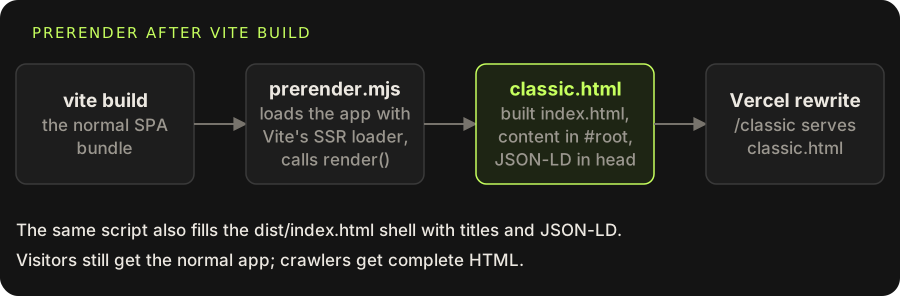
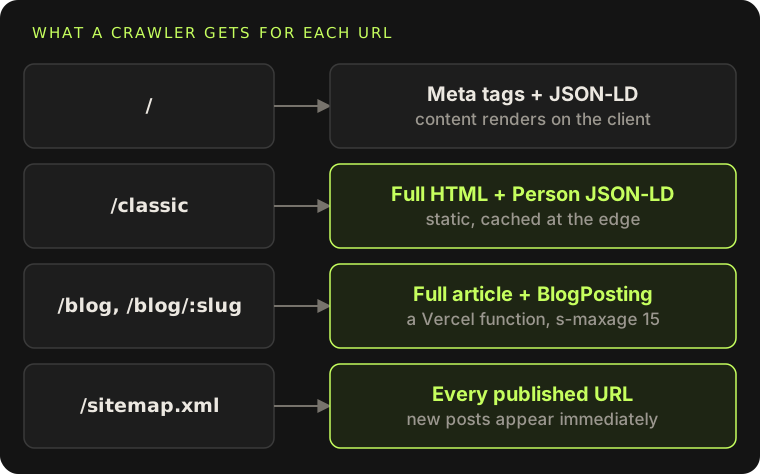
The portfolio has two views of the same content: the 3D room at / and a plain "Classic" view at /classic that recruiters can skim. The Classic view is ordinary React with no WebGL, so it can render on the server. After vite build, a small script loads the app through Vite's SSR loader and writes the result into a copy of the built index.html:
import { readFileSync, writeFileSync } from 'node:fs'
import { createServer } from 'vite'

const vite = await createServer({
  configFile: false,
  appType: 'custom',
  logLevel: 'error',
  server: { middlewareMode: true, hmr: false, ws: false },
})
try {
  const { render, jsonLd, PAGES, SITE } = await vite.ssrLoadModule('/src/prerender.tsx')
  const template = readFileSync('dist/index.html', 'utf8')
  const ld = `<script type="application/ld+json">${jsonLd()}</script>`

  const page = (meta, body) => {
    const url = SITE + meta.path
    return template
      .replace(/<title>.*?<\/title>/, `<title>${meta.title}</title>`)
      .replace(/(<link rel="canonical" href=")[^"]*/, `$1${url}`)
      .replace(/(<meta property="og:url" content=")[^"]*/, `$1${url}`)
      .replace(/(<meta property="og:title" content=")[^"]*/, `$1${meta.title}`)
      .replace('</head>', `    ${ld}\n  </head>`)
      .replace('<div id="root"></div>', `<div id="root">${body}</div>`)
  }

  writeFileSync('dist/index.html', page(PAGES['3d'], ''))
  writeFileSync('dist/classic.html', page(PAGES.classic, render()))
} finally {
  await vite.close()
}
src/prerender.tsx is tiny: it exports render(), which calls renderToString(<App />), plus the page metadata and the JSON-LD builder. The build command becomes:
{ "scripts": { "build": "tsc -b && vite build && node scripts/prerender.mjs" } }And Vercel serves the file for the clean URL:
{ "rewrites": [{ "source": "/classic", "destination": "/classic.html" }] }The one gotcha: the router during SSR
On the server there is no window.location, so the app does not know which page it is rendering. The router here is a tiny hook over useSyncExternalStore, and its third argument is the snapshot used during server rendering. Pointing it at /classic makes the prerender render the right view:
export function usePath() {
  return useSyncExternalStore(subscribe, getPath, () => '/classic')
}
In the browser the client renders over the same markup, so visitors get the normal app and crawlers get complete HTML. When the user switches views on the client, a small helper updates the title, canonical, description and Open Graph tags so a shared link always matches what is on screen.
Step 2: tell search engines who this is
Structured data is how a page says "this is a person, this is their job, these are their profiles". The site emits one JSON-LD graph with three nodes:
{
  "@context": "https://schema.org",
  "@graph": [
    { "@type": "Person", "@id": "https://mahmadmanzoor.com/#person",
      "name": "Muhammad Ahmad", "jobTitle": "Full-Stack & AI Product Engineer",
      "address": { "@type": "PostalAddress", "addressLocality": "Lahore", "addressCountry": "PK" },
      "knowsAbout": ["React", "Next.js", "Django", "Node.js", "LLMs"],
      "sameAs": ["https://github.com/mahmadmanzoor", "https://www.linkedin.com/in/…"] },
    { "@type": "WebSite", "@id": "https://mahmadmanzoor.com/#website", "publisher": { "@id": "https://mahmadmanzoor.com/#person" } },
    { "@type": "ProfilePage", "mainEntity": { "@id": "https://mahmadmanzoor.com/#person" } }
  ]
}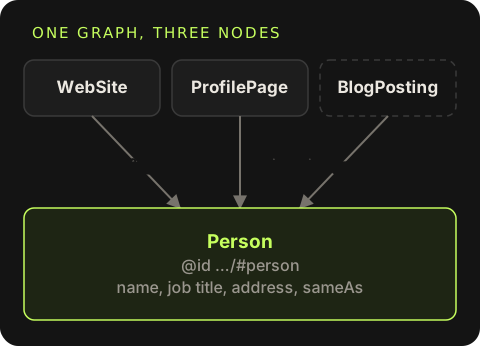
The @id values let the nodes refer to each other, and the same Person @id is reused as the author of every blog post. sameAs links the site to profiles search engines already trust. The page title and description carry the phrases people actually search for, such as "software engineer in Lahore", in normal sentences. Stuffing them in reads badly and does not help.
Step 3: a blog that publishes without a redeploy
Prerendering at build time works for pages that change when the code changes. Blog posts are written in a dashboard and saved to storage, so they need to be rendered when requested. A single Vercel function handles /blog and /blog/<slug>:
{
  "functions": { "api/blog-page.ts": { "includeFiles": "dist/blog.html" } },
  "rewrites": [
    { "source": "/blog", "destination": "/api/blog-page" },
    { "source": "/blog/:slug", "destination": "/api/blog-page?slug=:slug" },
    { "source": "/sitemap.xml", "destination": "/api/sitemap" }
  ]
}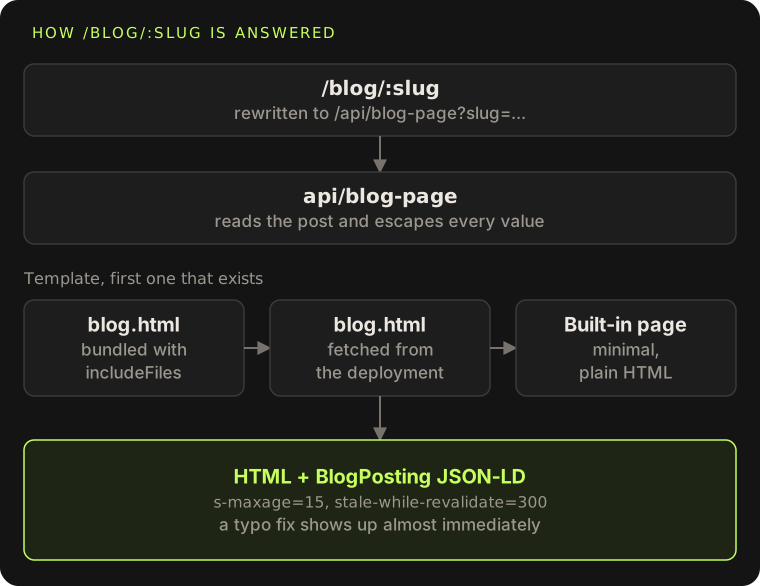
The function reads the post, renders the article to HTML with every value escaped, and injects it into a template that the build writes next to index.html (with the blog stylesheet already linked, so the article is styled before any JavaScript runs). includeFiles bundles that template into the function. If it were ever missing, the function falls back to fetching /blog.html from the deployment, and as a last resort to a minimal built-in page, so a configuration mistake degrades to plain HTML rather than a 500.
Each post page gets its own title, description, canonical URL, Open Graph image (the post's cover) and a BlogPosting JSON-LD block that points back to the same Person. The response is cached at the edge briefly:
const CACHE = 'public, max-age=0, s-maxage=15, stale-while-revalidate=300'Fifteen seconds at the edge means a burst of traffic is served from cache, while a fix to a typo shows up almost immediately.
The sitemap follows the content
A static sitemap.xml would need a redeploy for every post. Instead it is another small function that lists the fixed pages plus every published post, with its last-modified date. robots.txt points to it. Publishing a post in the dashboard makes it appear in the sitemap on the next request.
Two more details that matter for indexing:
- The private routes (
/sign-in,/dashboard) sendX-Robots-Tag: noindex, nofollowand are left out of the sitemap. - Preview deployments are
noindextoo, so the same content on a*.vercel.appURL never competes with the real domain.
Step 4: keep it fast
Rankings and Lighthouse both care about speed, and a 3D site is easy to make slow. The rules that kept it fast:
- The Classic view ships no Three.js at all. The 3D chunk loads only behind the boot screen on
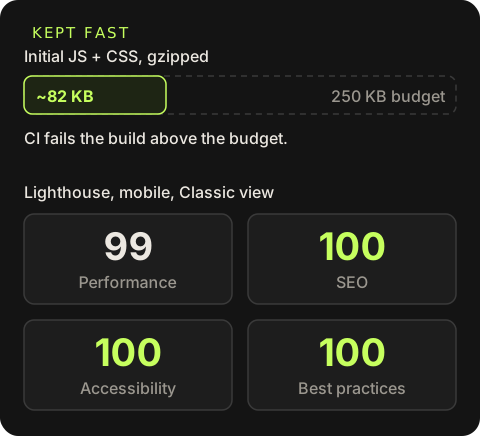
/. - A CI budget fails the build if the initial JS and CSS go over 250 KB gzipped. It currently sits around 82 KB.
- Screenshots are WebP, at most 1280 px wide, with smaller thumbnails for cards.
- Long-lived
immutablecache headers on hashed assets.
The Classic view scores 99 for performance and 100 for SEO, accessibility and best practices on mobile Lighthouse.
After deploying
Verify the domain in Search Console
Use a DNS TXT record so it covers every subdomain and protocol.
Submit the sitemap
Submit
https://your-domain/sitemap.xmlonce. Because it is generated, you do not need to submit it again for new posts.Request indexing for the key pages
Use URL Inspection on the prerendered page and check "View crawled page" shows real content, not an empty root div.
Validate the structured data
Run the page through the Rich Results Test and the schema.org validator.
Link to it from places that are already indexed
GitHub profile and repository homepages, LinkedIn, and cross-posts of articles that set a canonical URL back to the original.
When you should just use a framework
This approach fits a small site with a handful of indexable routes and one dynamic section. If most of your pages are data-driven, need per-request personalisation, or you find yourself writing a router, a cache layer and a template system, that is the point where Next.js, Remix or Astro will save you time. For this site, about 60 lines of prerender script and one function were enough.