· 7 min read
Setting up REA for agent-driven reverse engineering in Claude Code
REA gives a coding agent reverse-engineering tools over MCP. How I installed it, what it can read, the workflows I use on my own builds, and the rules I keep.
Sometimes the answer is not in a source repository. It is in a build: the Electron app that went out last month, an APK on a test phone, a native binary from an old release with no tag. Questions like "did the source maps ship?" or "what changed between these two builds?" need someone to open the artifact itself.
REA, short for "reverse engineer anything", is an MCP server and CLI that gives a coding agent the tools for that job. Its README describes it as reverse engineering with agents, "from app behavior down to native binaries", and it runs locally. I have it registered in Claude Code as an MCP server named rea, alongside its skill, reverse-engineer-anything. This post covers the setup, what it can analyse, the workflows I use on software I own, and the rules I keep.
Two pieces: the server and the skill
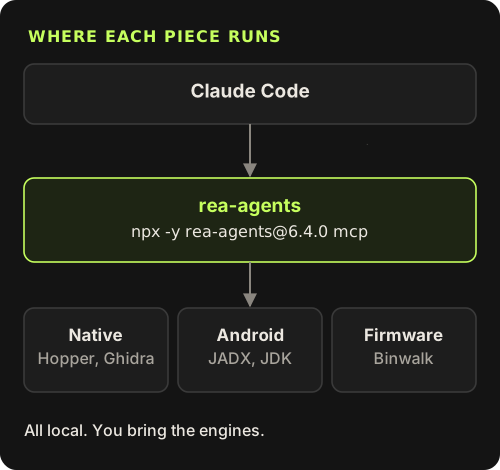
REA comes in two parts, and the skill file is explicit that one does not imply the other. The MCP server, published on npm as rea-agents, provides the tools. The skill is a set of instructions that teaches the agent when to use REA, which tool to call first, and how to report results. Installing the skill does not register the server, and registering the server does not install analysis engines.
The skill also says when not to use REA: for ordinary analysis of a complete source repository, use normal repository tools. That matches my experience. REA is for shipped artifacts and runtime behaviour, not for reading code you already have.
Installing it
Use the official sources only. The README warns that a similar repository name or a copied README does not make a download official, and lists three: the morluto/rea repository, rea.tools and the rea-agents npm package. You need Node.js 22.x (22.23.4 or later), 24.x (24.22.1 or later) or 26.12.1 and later.
Preview the setup for Claude Code
The dry run prints the paths it would change, the backups and the skill it would install, without writing anything.
npx -y rea-agents@latest setup --client claude_code --dry-runApply it
Setup registers the MCP server and installs the skill for the client you name. Run the plain
npx rea-agents setupto pick clients interactively.npx rea-agents setup --client claude_codeCheck readiness
Doctor reports registration and skill state as JSON. It cannot prove the running agent is connected, so restart Claude Code after setup.
npx rea-agents doctor --client claude_code --skill --jsonOr register it by hand, pinned
The installation guide gives a manual command with a pinned version. Pinning means an upgrade is a decision, not a surprise.
claude mcp add --scope local rea -- npx -y rea-agents@6.7.0 mcp
My own registration is the manual form, pinned to the version I installed, with one environment variable that points REA at my Hopper install. Your path will differ. Other engines use their own variables, such as GHIDRA_INSTALL_DIR and JAVA_HOME.
"rea": {
  "command": "npx",
  "args": ["-y", "rea-agents@6.4.0", "mcp"],
  "env": {
    "HOPPER_LAUNCHER_PATH": "/Users/you/Applications/Hopper Disassembler.app/Contents/MacOS/hopper"
  }
}
Engines are bring-your-own. Native decompilation needs Hopper, Ghidra or IDA. Android analysis needs a headless JADX MCP JAR (version 0.7.1, selected with REA_JADX_MCP_JAR) and Java 17 or newer. Firmware extraction uses Binwalk or Unblob on Linux. Static JavaScript and .NET inspection need no engine at all, so those are good first targets. REA setup does not install unrelated software, and commercial tools like IDA and Hopper must be licensed by you.
What it can analyse
The skill’s first rule is to route by target: look at what the user supplied, and pick the first tool from that. This is the map I keep in my head.
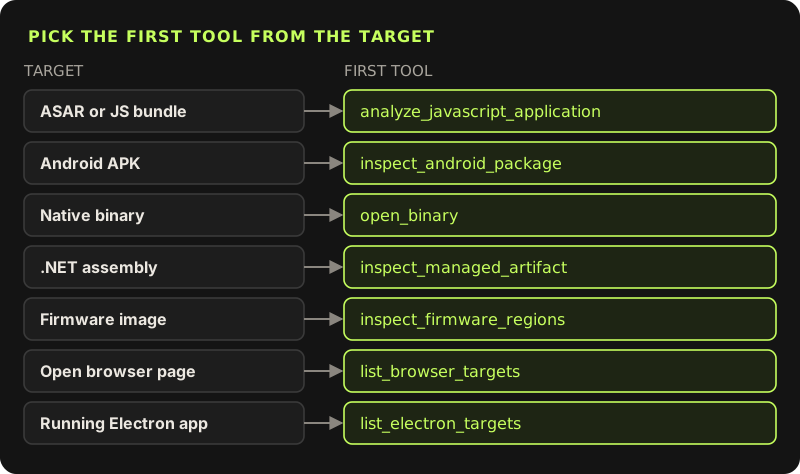
- Native binaries.
open_binarybinds a target, then focused tools search strings, list procedures, decompile, and follow callers and callees. For Mach-O,observe_native_callscan record which functions run, but it launches the target under LLDB, so it really executes. - Electron and JavaScript.
analyze_javascript_applicationreads an ASAR or an extracted tree, including source maps, and builds a module graph. - Android.
inspect_android_packagereads the manifest and package identity; class search, method decompilation and reference tracing follow. The APK is never launched. - Managed code and firmware.
inspect_managed_artifactinspects .NET assemblies without executing them.inspect_firmware_regionsandextract_firmwarehandle images, with extraction written to a new folder you choose. - Web pages and running apps.
list_browser_targetsandlist_electron_targetsattach to pages you already have open, for passive observation.
Evidence, not vibes
What I like most about REA is how it reports. Every tool returns an Evidence record with an ID, and the skill tells the agent to separate what was observed from what was inferred and what is still unknown. A decompiled function is an observation of analysis output, not original source. A static result never proves that code ran.
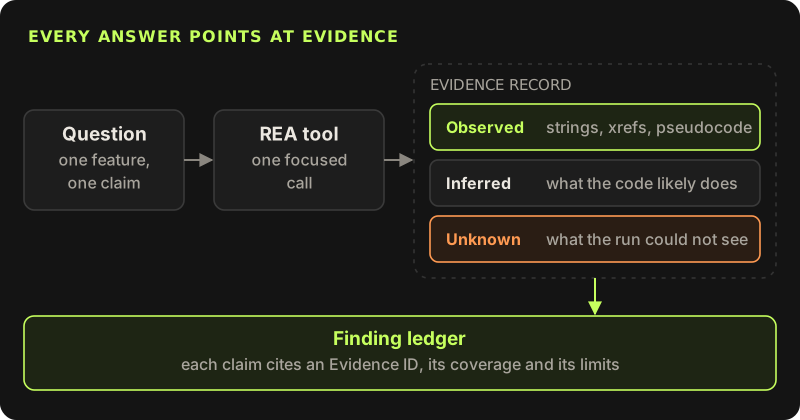
For broad questions the skill asks for a finding ledger: each conclusion linked to its Evidence IDs, the evidence type, the search boundary and what remains unknown. There are tools for the gaps too: record_unknown tracks an open question, and comparison tools like compare_artifacts, compare_functions and find_changed_behavior treat static differences as candidates, not proof.
Workflow 1: what did my Electron build ship?
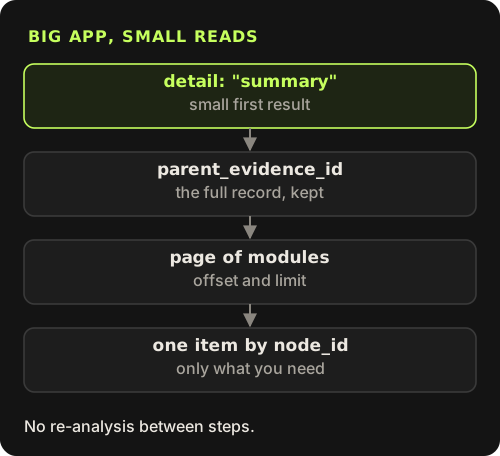
This is the workflow I use most. Point the agent at the packaged ASAR of an app you built and ask a narrow question, such as whether source maps or a debug flag made it into production. For a big app, the skill says to request detail: "summary" first, then use the returned parent_evidence_id with inspect_analysis_view to page through modules and read one item at a time, without running the analysis again.
Use REA on /Applications/MyApp.app/Contents/Resources/app.asar.
Start with a summary. Did any source maps or .env files ship in this build?
List each finding with its Evidence ID and say what you could not check.
The same works from the shell when I want the full record on disk instead of in the agent’s context. These commands come from the skill’s recovery guide:
rea analyze-javascript-application /absolute/path/to/app --json > app-evidence.json
jq -c '{source: {kind: "inline", evidence: .}, view: {kind: "summary"}}' app-evidence.json > app-view.json
rea inspect-analysis-view app-view.json
Workflow 2: compare two releases
When a bug appears between two versions and the tags are missing, I give the agent both artifacts and ask what changed around one feature. For native code, it opens each binary, finds the function by strings or names and compares the function evidence. For JavaScript, it compares module graphs. The answer is a list of candidate changes with evidence, which I then confirm by running both builds. The tool narrows the search; it does not replace the test.
Workflow 3: watch a page I own
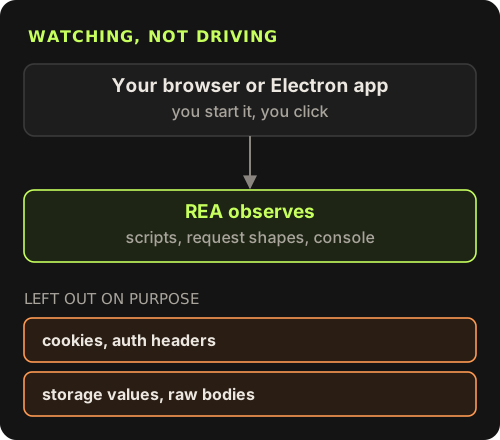
Runtime observation is passive. You start the browser or Electron app with a debugging port on loopback, then pass that endpoint in the request. REA lists eligible pages and captures what you ask for, such as scripts, network shape and console output. It never clicks, navigates or runs page JavaScript, and it deliberately leaves out credentials, cookies, authorization headers, storage values and raw WebSocket or JSON bodies. When I have static evidence from the bundle and runtime evidence from the page, reconcile_javascript_runtime matches them up, and it reports mismatches instead of guessing.
# a separate profile, debugging port on loopback only
"/Applications/Google Chrome.app/Contents/MacOS/Google Chrome" \
  --remote-debugging-port=9222 --user-data-dir="$HOME/.rea-chrome"
Use it only where you are allowed to
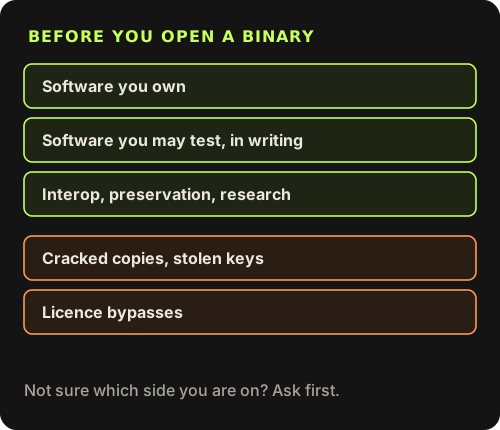
Reverse engineering tools are dual-use, and an agent makes them faster, which raises the stakes. The REA README says it is for lawful research, education, interoperability, software preservation and analysis of software you own or are authorised to examine, and that cracked copies, stolen keys, unauthorised key sharing and licence bypasses are not authorised. I keep a few rules of my own on top:
- Only analyse software I built or have written permission to test. A client saying "sure" in a call is not written permission.
- Read the licence. Some end-user licences forbid reverse engineering even for software you paid for, and the law differs by country.
- Keep runtime work on a test machine or profile. Native call observation runs the target for real.
- Never paste secrets you find into chat, tickets or posts. If a build leaks a key, rotate it and report it to the owner.
- Pin the version and install from the official sources only.
Inside those lines, REA is the most useful agent tool I have added this year for questions about builds rather than source. It turns "I think the old version did this" into a list of claims with evidence, which is the kind of answer I can act on.
REA installation guideSetup per client, doctor checks, manual MCP registration and engine environment variables.github.com/morluto/rea/blob/main/docs/installation.md