· 6 min read
How to evaluate text-to-speech voices before you ship them
Signal Tank is a small lab for comparing TTS voices on your own scripts. It measures time to first byte and time to complete, keeps the API key on the server, and records clean reference audio for voice cloning.
Picking a voice for a product usually goes like this: open the provider's demo page, type "Hello, how are you today?", listen to six voices, pick the one that sounds nicest. Then the voice goes into a support agent that has to read order numbers, or a narrator that has to get through Urdu place names, and it falls apart. Or it sounds right but takes two seconds before anything plays, which in a conversation feels like forever.
I built Signal Tank to make that choice with evidence. You write or pick a real script, choose a voice and settings, generate a take, and every take is saved next to its numbers so you can compare them side by side. The code is small and public, and the patterns in it apply to any TTS provider.
Signal Tank on GitHubA latency-aware text-to-speech lab: server proxy, preset voices, safe cloning and Web Audiogithub.com/mahmadmanzoor/signal-tank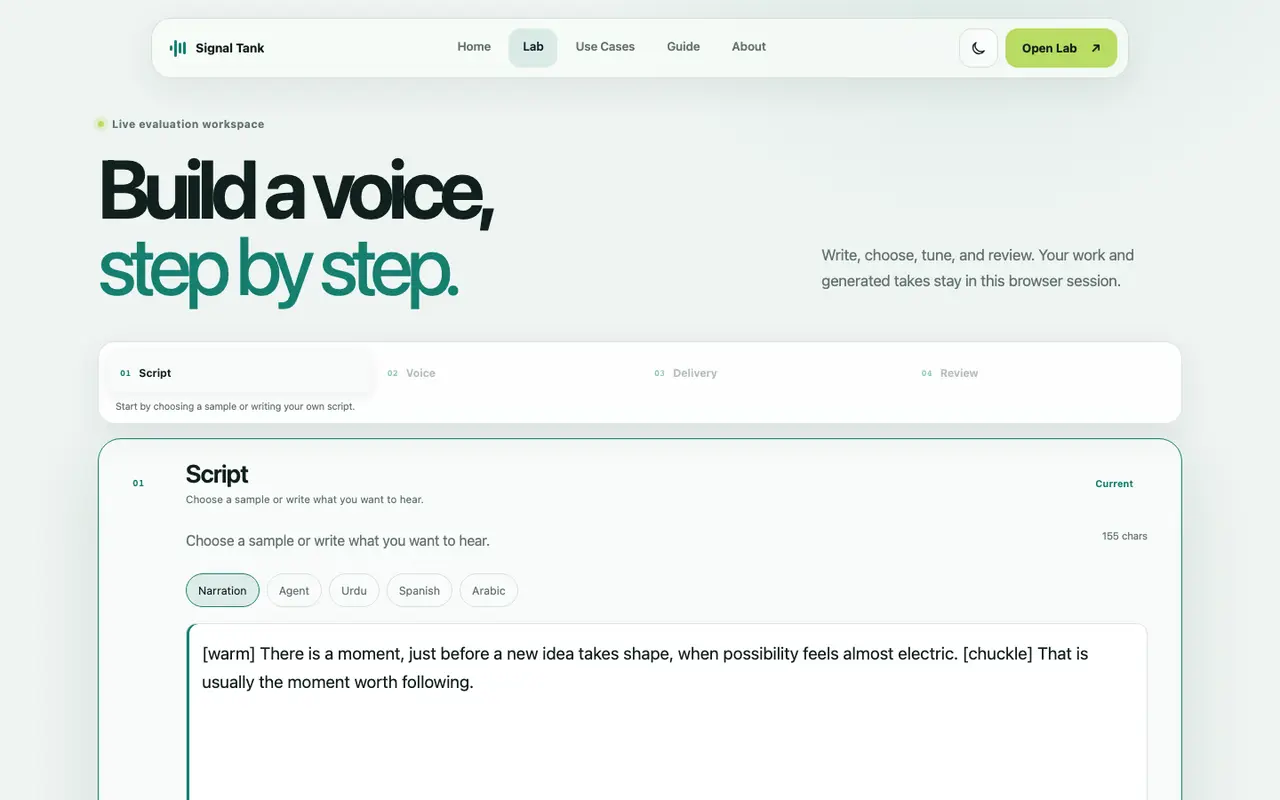
Test with scripts that look like production
The lab ships five sample scripts: narration, a support agent reading structured details, Urdu, Spanish and Arabic. They exist because the failures I cared about only show up with real content: numbers and codes read wrong, a switch between languages, a long sentence where the voice loses energy halfway. A greeting tests none of that.
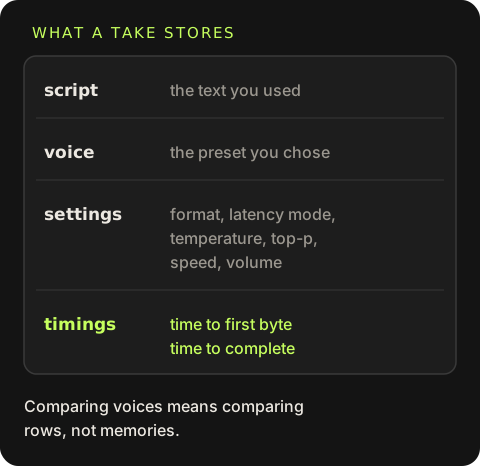
Every take stores the script, the voice, the settings (format, latency mode, temperature, top-p, speed, volume) and two timings. Comparing voices then becomes comparing rows, not memories.
Two numbers, not one
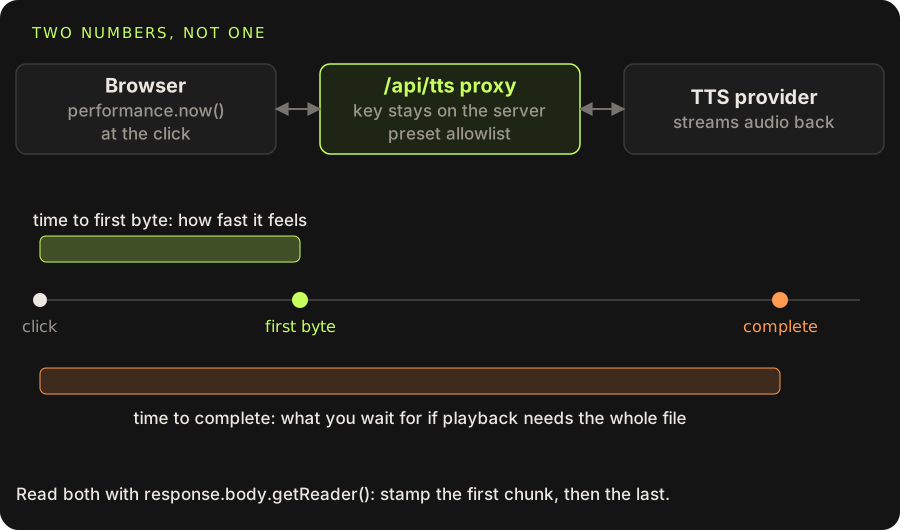
"Latency" for TTS hides two different numbers:
- Time to first byte is how long until audio starts arriving. With streaming playback, this is how fast the product feels.
- Time to complete is how long until the whole file has arrived. If your player needs the complete file, this is what the user actually waits for.
A voice can win one and lose the other, and the latency mode you choose shifts the balance. The browser can measure both by reading the response as a stream instead of calling response.blob():
const started = performance.now()
const response = await fetch('/api/tts', { method: 'POST', body: data })

const reader = response.body.getReader()
const chunks = []
let firstByte
while (true) {
  const { value, done } = await reader.read()
  if (done) break
  if (firstByte === undefined) firstByte = performance.now() - started
  chunks.push(value)
}
const total = performance.now() - started
const blob = new Blob(chunks, { type: response.headers.get('content-type') })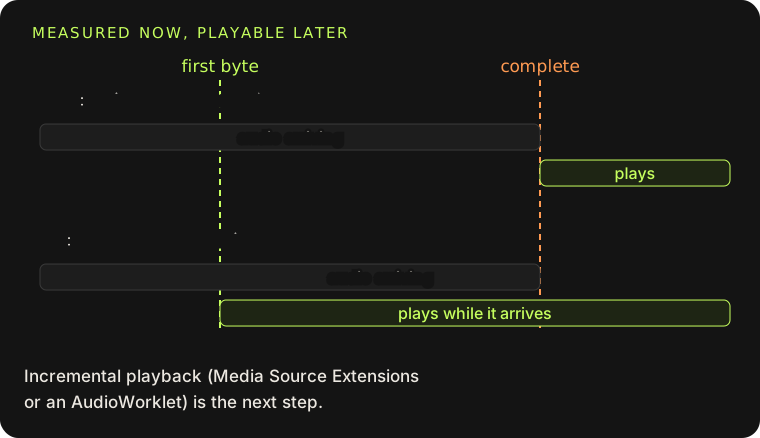
performance.now() is monotonic and sub-millisecond, unlike Date.now(). Both numbers include the whole round trip through your own server, which is what a user experiences, so measure from the browser rather than trusting the provider's dashboard.
One limit: the lab currently waits for the complete file before playing it. That is fine for comparing voices, but it means the "first byte" number is a measurement, not something you can hear yet. Incremental playback through Media Source Extensions or an AudioWorklet is the next step.
Keep the key on the server
The browser never talks to the TTS provider. It posts a form to /api/tts, a Vercel function that holds the key, validates everything, and streams the audio back:
let bytes = 0
const counted = data.pipeThrough(new TransformStream({
  transform(chunk, controller) {
    bytes += chunk.byteLength
    controller.enqueue(chunk)
  },
  flush() {
    log('signal.tts.complete', { requestId, bytes, durationMs: Math.round(performance.now() - started) })
  },
}))

return new Response(counted, {
  status: 200,
  headers: { 'Cache-Control': 'no-store', 'Content-Type': contentType, 'X-Request-ID': requestId },
})
The TransformStream passes chunks straight through, so streaming is not delayed, while it counts bytes and logs the total when the stream ends. The server logs when headers arrived and when the body finished, which gives you the provider's share of the latency separately from the network to the user. The request ID goes back in a header so a slow take in the UI can be matched to its log line. Logs carry character counts and settings only, never the script, and a test checks that.
Do not let the client pick arbitrary voices
An early version sent the provider's voice reference ID from the browser. That meant anyone could call my endpoint, on my credits, with any voice in the provider's library, including voices cloned from other people. Now the server owns a frozen allowlist and the client sends only a preset name:
export const VOICE_PRESETS = Object.freeze({
  balanced: { label: 'Balanced' },
  'female-american': { label: 'Female · American', referenceId: '…' },
  'male-british': { label: 'Male · British', referenceId: '…' },
  // …
})

if (form.getAll('voicePreset').length !== 1 || !VOICE_PRESETS[voicePreset]) {
  throw inputError('Choose one available voice profile.')
}
if (referenceId) throw inputError('Manual voice references are not supported.')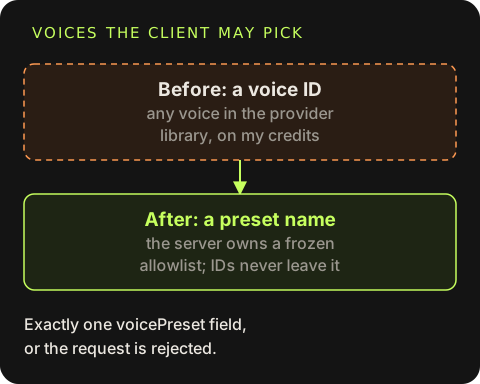
getAll(...).length !== 1 is a small check worth stealing. Multipart forms allow the same field more than once, and different layers may read the first or the last value. Requiring exactly one closes that gap. Every numeric setting is range-checked too: temperature and top-p 0 to 1, speed 0.5 to 2, volume -20 to 20.
Map provider errors to messages you control
Upstream errors are translated into a short, fixed set: a rejected key, no credits (402), rejected settings (422), busy (429), and everything else as a generic 502. The user gets a useful message, and nothing from the provider's internals leaks into the UI. A missing key returns a clear 503 telling you which environment variable to set.
Recording reference audio for a cloned voice
Cloning needs a clean sample of the speaker, and most bad clones come from bad samples. The recorder does three things to help:
Pick a format the browser can actually record
Safari and Chrome disagree, so the recorder tries
audio/webm;codecs=opus, thenaudio/mp4, thenaudio/ogg;codecs=opus, and uses the first thatMediaRecorder.isTypeSupportedaccepts.Show a live level and warn about silence
A Web Audio
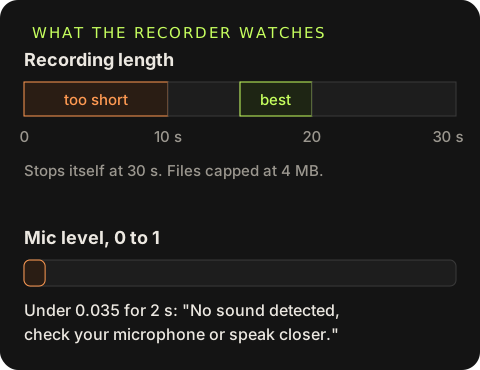
AnalyserNode(fftSize 256) computes an RMS level every frame. If the smoothed level stays under 0.035 for two seconds, the UI says "No sound detected, check your microphone or speak closer."Keep the sample in a useful length
At least 10 seconds, stopped automatically at 30, with 15 to 20 recommended. Files are capped at 4 MB to stay under the Vercel request body limit.
The level meter is a few lines:
analyser.getByteTimeDomainData(samples)
let energy = 0
for (const s of samples) {
  const centered = (s - 128) / 128
  energy += centered * centered
}
const level = Math.min(1, Math.max(0, (Math.sqrt(energy / samples.length) - 0.012) * 8))
smoothed += (level - smoothed) * 0.24
Cloning also requires an explicit consent checkbox and the exact transcript of what was read. The transcript improves the clone, and the consent step is the minimum for working with someone's voice.
A checklist before you pick a voice
- Use your real scripts, including the awkward ones: numbers, codes, names, a second language.
- Measure time to first byte and time to complete from the browser, and record which latency mode produced them.
- Run each voice more than once. A single take tells you very little about variance.
- Listen on the device your users have. Laptop speakers hide a lot.
- Keep keys and voice IDs on the server, and allowlist what the client may choose.
- Log sizes and timings, never the text people typed.
git clone https://github.com/mahmadmanzoor/signal-tank
cd signal-tank && npm install
cp .env.example .env   # add your key
npm start              # http://127.0.0.1:3000/lab
Without a key the lab still runs and the generate button returns a clear message, so you can try the UI first.