· 8 min read
Structured outputs that do not break: schemas, Zod and a repair retry
A JSON schema guarantees the shape of an answer, not that it is right. Here is the layering I use for LLM extraction: constrained output, semantic checks in Zod, one repair retry with the errors fed back, and a human when that is not enough.
A few years ago the hard part of getting JSON from a language model was getting JSON at all. You asked nicely, you got a code fence with a trailing comma, and you wrote a regex to dig the object out. That problem is mostly solved. Current APIs can constrain the output to a JSON schema, so the answer always parses and always has the fields you asked for.
The problem that is left is quieter. When I worked on extracting roof measurements from PDF reports, the worst failures were never broken JSON. They were valid objects with the wrong numbers in them: a roof in squares read as square feet, a total counted twice. The schema was happy every time.
So I think of structured output as layers. Each one catches a different kind of failure, and the last one is a person.
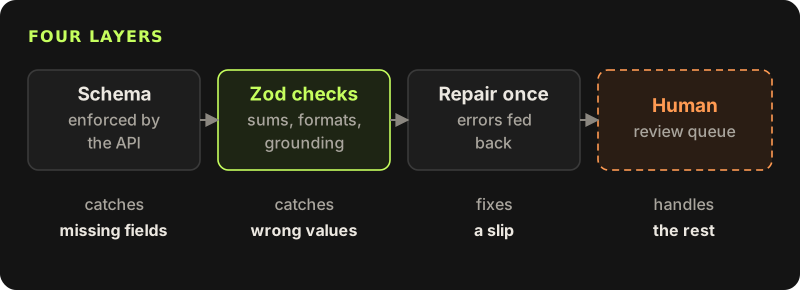
The examples use the Anthropic TypeScript SDK and Zod. The teaching example is a small extractor that reads the text of a roof report and returns its measurements.
Layer one: let the API enforce the shape
There are two ways to get structured data out of Claude, and I pick between them by asking what the object is for.
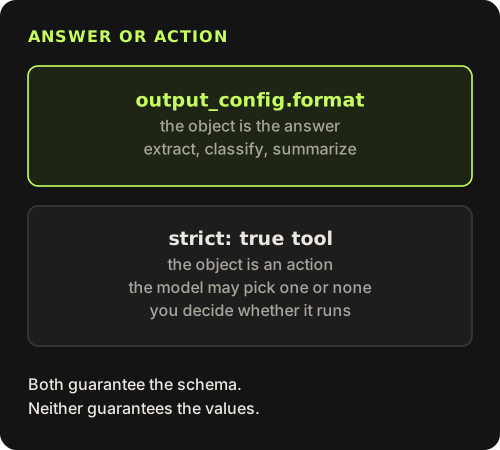
If the object is the answer, use output_config.format and let the SDK parse it. The model has one job and the response is the data. If the object is the argument to an action, and the model might choose between several actions or none, define a tool with strict: true. The arguments are then guaranteed to match the tool's schema, and you still get to decide whether to run it.
For an extractor the object is the answer. I define the shape in Zod, keeping this schema to plain types only, because it is turned into a JSON schema for the API.
import { z } from "zod";

export const Facet = z.object({
  pitch: z.string().describe('rise over a 12 inch run, written like "6/12"'),
  areaSqFt: z.number(),
});

export const ReportShape = z.object({
  sourceUnit: z.enum(["sq_ft", "squares"]).describe("the unit the report uses for area"),
  totalAreaSqFt: z.number().nullable().describe("converted to square feet; null if the report has no total"),
  facets: z.array(Facet),
  ridgeFt: z.number().nullable(),
  valleyFt: z.number().nullable(),
});
export type Report = z.infer<typeof ReportShape>;
The describe() strings end up in the schema the model sees. They are the cheapest prompt engineering there is: one line, next to the field it explains.
Layer two: shape is not meaning
A schema cannot say "the facet areas add up to the total" or "this number must appear somewhere in the report". Zod can, with superRefine. I build the checks as a function of the source text, so a check can look back at what the model was reading.
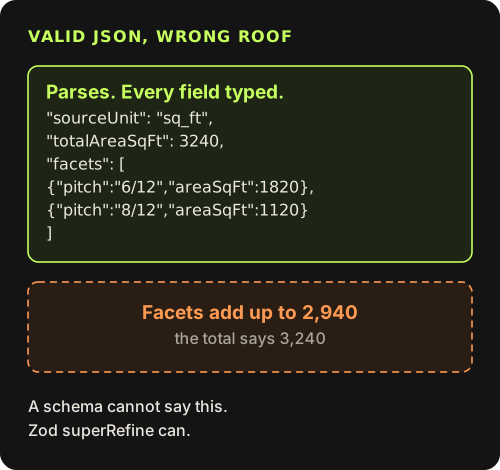
The check I would keep if I could keep only one is the grounding check. Every number the model claims to have read should be findable in the source, either as written or in the other unit. It catches invented values, and it catches the classic unit slip: the report says 32.4 squares, the model correctly says the unit is squares, then forgets to convert and returns a total of 32.4. Converted back, that is 0.324 squares, which is nowhere in the text, so the check fails.
import { ReportShape } from "./schema";

const numbersIn = (text: string) =>
  new Set((text.replace(/(\d),(\d{3})/g, "$1$2").match(/\d+(?:\.\d+)?/g) ?? []).map(Number));

export function reportChecks(source: string) {
  const seen = numbersIn(source);
  // totals are stored in square feet; a report in squares shows them divided by 100
  const grounded = (n: number, unit: "sq_ft" | "squares") =>
    unit === "squares" ? seen.has(Math.round(n) / 100) : seen.has(n);

  return ReportShape.superRefine((r, ctx) => {
    if (r.totalAreaSqFt !== null && !grounded(r.totalAreaSqFt, r.sourceUnit))
      ctx.addIssue({ code: "custom", path: ["totalAreaSqFt"], message: `${r.totalAreaSqFt} does not appear in the report (unit: ${r.sourceUnit})` });

    if (r.totalAreaSqFt !== null && r.facets.length > 0) {
      const sum = r.facets.reduce((s, f) => s + f.areaSqFt, 0);
      if (Math.abs(sum - r.totalAreaSqFt) > r.totalAreaSqFt * 0.02)
        ctx.addIssue({ code: "custom", path: ["facets"], message: `facet areas add up to ${sum}, but totalAreaSqFt is ${r.totalAreaSqFt}` });
    }

    r.facets.forEach((f, i) => {
      if (!/^\d{1,2}\/12$/.test(f.pitch))
        ctx.addIssue({ code: "custom", path: ["facets", i, "pitch"], message: `pitch "${f.pitch}" is not written as N/12` });
    });
  });
}
Notice the error messages. They are written for the model as much as for me. Each one says which field is wrong, what value was there and what the rule is. That pays off in the next layer.
Before you validate, check why the model stopped
There are three ways to get a response that should not reach your checks at all. A stop_reason of max_tokens means the output was cut off. A refusal means a safety classifier declined the request. And parsed_output can be null. None of these throw an exception. They are successful HTTP responses with nothing useful inside, so the code has to look for them.
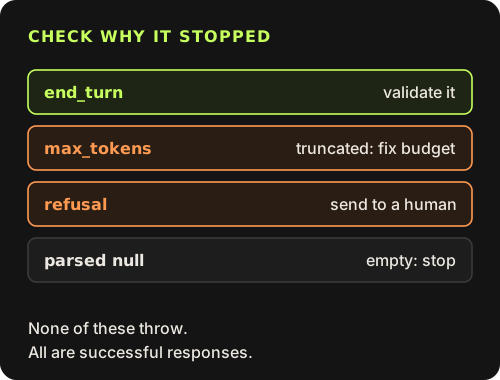
A truncated extraction is not worth repairing. Either the output budget is too small for the document, which is a bug to fix, or the model went off on a long tangent. Neither gets better by asking again with the same settings.
Layer three: one repair retry, with the errors
When validation fails, retrying the same request blind mostly reproduces the same mistake. Telling the model exactly what failed works much better. The repair request contains the source, the previous answer and the list of failed checks, and asks for the full corrected object.
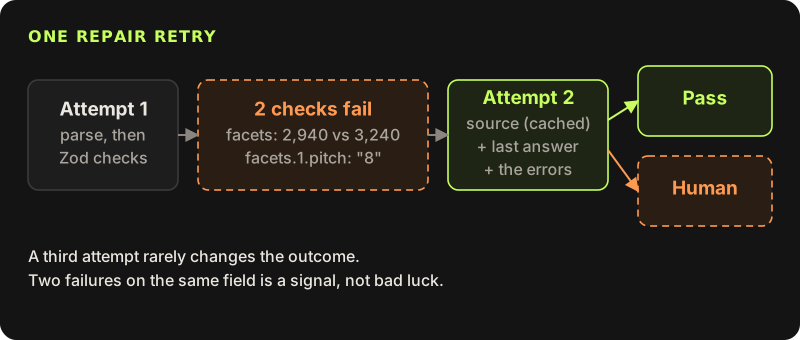
I build each attempt as a fresh single request rather than a growing conversation. The source text is the first block and carries a cache breakpoint, so the second attempt reads it from the prompt cache instead of paying for it again.
import Anthropic from "@anthropic-ai/sdk";
import { zodOutputFormat } from "@anthropic-ai/sdk/helpers/zod";
import { ReportShape, type Report } from "./schema";
import { reportChecks } from "./checks";

const client = new Anthropic();
const SYSTEM = "You extract roof measurements from report text. Use only values that appear in the report. If a value is missing, return null instead of estimating it.";

export type Extraction =
  | { ok: true; data: Report; attempts: number }
  | { ok: false; reason: "refusal" | "truncated" | "empty" | "invalid"; issues: string[]; raw: unknown };

export async function extractReport(source: string): Promise<Extraction> {
  let previous: unknown = null;
  let issues: string[] = [];

  for (let attempt = 1; attempt <= 2; attempt++) {
    const ask = previous === null
      ? "Extract the measurements from the report above."
      : `Your previous answer was:\n${JSON.stringify(previous)}\n\nIt failed these checks:\n${issues.map((i) => `- ${i}`).join("\n")}\n\nRe-read the report and return the full corrected object.`;

    const res = await client.messages.parse({
      model: "claude-sonnet-5-5",
      max_tokens: 16000,
      system: SYSTEM,
      messages: [{
        role: "user",
        content: [
          { type: "text", text: `<report>\n${source}\n</report>`, cache_control: { type: "ephemeral" } },
          { type: "text", text: ask },
        ],
      }],
      output_config: { format: zodOutputFormat(ReportShape) },
    });

    if (res.stop_reason === "refusal") return { ok: false, reason: "refusal", issues: [], raw: null };
    if (res.stop_reason === "max_tokens") return { ok: false, reason: "truncated", issues: [], raw: null };
    if (!res.parsed_output) return { ok: false, reason: "empty", issues: [], raw: null };

    const checked = reportChecks(source).safeParse(res.parsed_output);
    if (checked.success) return { ok: true, data: checked.data, attempts: attempt };

    previous = res.parsed_output;
    issues = checked.error.issues.map((i) => `${i.path.join(".") || "(root)"}: ${i.message}`);
  }
  return { ok: false, reason: "invalid", issues, raw: previous };
}
Why only one retry? Because the second attempt is where the information is. If the model fixes the problem when told exactly what is wrong, the first answer was a slip. If it fails the same check again with the error in front of it, the input is unusual, the report is ambiguous, or the check is wrong. A third attempt rarely changes that, and each one costs a full request. Two failed attempts on the same field is a signal, and the right response to that signal is a person.
I log every repair, including the ones that succeed. A check that triggers a repair on a large share of documents means the prompt or the field description is wrong, and that belongs in the eval set, not in a retry loop.
Layer four: a human, on purpose
The human fallback is not an error path. It is part of the design, and it deserves a real screen. These are the cases I send to review:
- the repair retry failed, with the issue list attached
- a refusal or a truncated response
- values that pass every check but sit outside business limits, like a house with 40,000 square feet of roof
- two sources that disagree, such as a total in the summary table that differs from the detail table
- any field where a wrong value costs money and the model was not reading it straight off the page
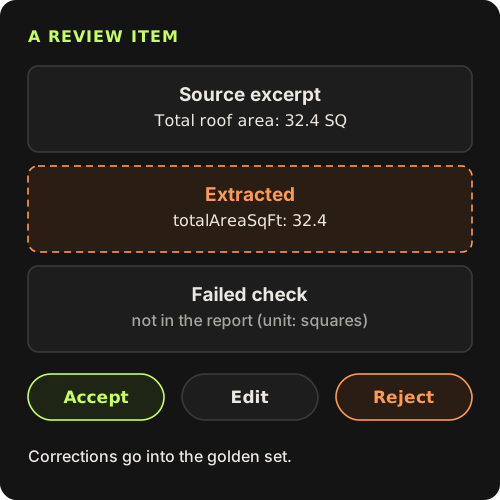
The reviewer sees the relevant part of the source, the extracted fields, and the exact check that failed. They can accept, correct or reject. Every correction is saved with the input, and that pair goes straight into the golden set, which I wrote about in the post on evals. Over time the cases that reach a human become the cases the harness tests most carefully.
The short version
Pick the mechanism by purpose
Use output_config.format when the object is the answer, and a strict tool when the object is the argument of an action.
Keep the API schema plain, put meaning in Zod
Describe fields in the schema and check sums, formats and grounding with superRefine.
Check the stop reason before the content
Truncation, refusal and an empty parse are successful responses that must not reach your checks.
Repair once, with specific errors
Send the source, the previous answer and the failed checks. Cache the source so the retry is cheap.
Send the rest to a person and learn from it
Show the source next to the output, record the correction, and add it to the eval set.
Schemas made JSON boring, which is good. The interesting work moved one layer up, to deciding what "correct" means for your data and writing it down as code the model can read when it gets it wrong.