· 6 min read
Let the model talk, make humans press the button
In a WhatsApp sales assistant demo, the language model can read free text and suggest a step, but nothing happens until the user taps a button the server itself offered.
I built a demo of a WhatsApp assistant for roofing sales. A contractor messages it, gets a list of new leads, picks one, sends an outreach email, records the homeowner's go-ahead, pulls in roof measurements and ends with a priced proposal that gets emailed out. All of it happens inside one WhatsApp chat.
People do not type commands in WhatsApp. They type "send the email to the second one" or "what about the one on Oak Street". So a language model reads the free text. The interesting part of the project was deciding what that model is allowed to do, and the answer I landed on is: nothing, directly. It can understand and suggest. Every action that changes something runs only after the user taps a button that the server itself put on screen.
The repository is public and runs fully in a local demo mode, so everything below can be checked in the code.
The model suggests, the buttons decide
Free text goes to an interpret() function, which calls the OpenAI Responses API with a strict JSON schema, a 12-second timeout, an 800-token output cap and store: false. The model returns an intent (search, select, action or conversation), an optional option id, an optional location and a short reply.
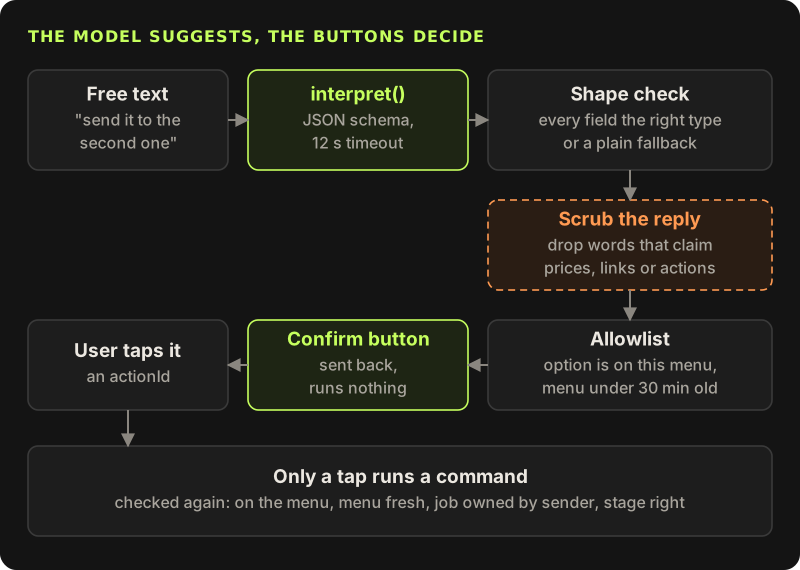
Before any of that output is used, it goes through three checks.
Shape. The intent must be one of the four values, the reply must be a string under 1000 characters, and the ids must be strings or null. Anything else, along with timeouts, HTTP errors and incomplete responses, drops to a plain fallback that never calls the model's output at all.
The reply scrubber. The model's short reply is shown to the user, so it must not claim things. A regex throws away any reply that contains a currency sign followed by a digit, a link, a completion word such as "sent", "approved" or "scheduled", or something like "reply yes and I will send it". The user sees the app's own wording instead. Prices and statuses in this chat always come from the job record, never from generated text.
The allowlist. If the model points at an option, the id must be one of the leads or buttons this sender was actually shown, from a menu that is less than 30 minutes old.
const allowed = new Set([
  ...context.displayedLeads.map((lead) => `lead:${lead.id}:select`),
  ...context.displayedActions.map((action) => action.id),
])
if (parsed.optionId !== null && parsed.optionId !== 'latest-leads' && !allowed.has(parsed.optionId))
  throw new Error('Unallowlisted option')
Even after passing all three, an "action" intent does not run the action. It returns a message like "Please confirm with Approve outreach" and one button. The only way to actually run a command is to tap a button.
A tap is checked again
When a button is tapped, WhatsApp sends its id back. The id is not trusted either. It must be on the menu stored for that phone number, the menu must still be fresh, and the command handler then checks that the job belongs to this sender and that the job is at the right stage.
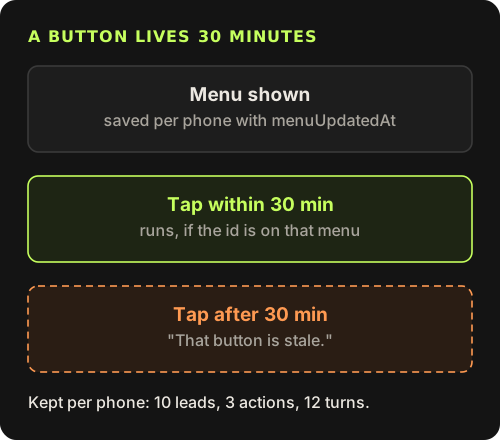
WhatsApp chats scroll. An old message from yesterday still has its buttons, and tapping one of them should not approve a proposal that has moved on since. So each phone number has a small stored context: up to 10 displayed leads, 3 displayed actions, the last 12 turns of history and the time the menu was shown.
A tap on an id that is not on the current menu, or on a menu older than 30 minutes, fails with "That button is stale. Please request the latest leads again." The user gets a fresh "New leads" button, so the chat never dead-ends.
Stages keep handlers honest
Each job moves through fixed stages, and every handler starts by checking that the job is where it expects.
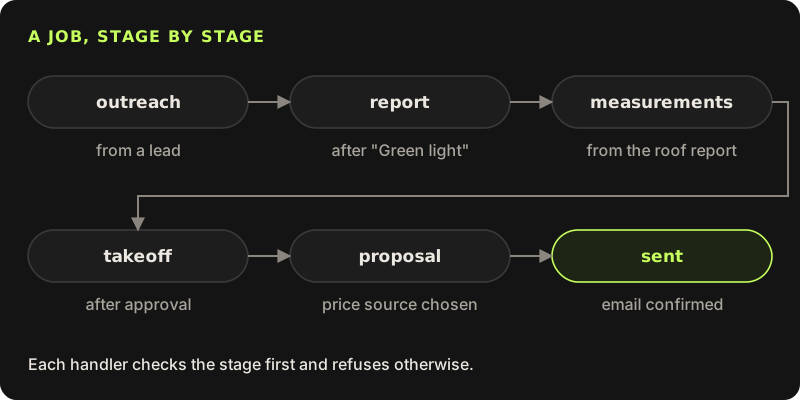
Outreach starts when a lead is chosen. Recording the homeowner's go-ahead moves the job to the report stage, and only if the outreach email has had a reply. A roof report produces measurements, approving them produces a takeoff, choosing a price source produces a proposal, and confirming the proposal email marks it sent.
If something asks for a step at the wrong time, the handler throws an error like "Green light is not available at this stage." That error comes back to the user as a normal message, so a confused tap gets an explanation instead of a silent failure. It also means a model that somehow suggested the wrong step would still be stopped one level down.
Every outbound email is two taps
Emails are the one place where a mistake leaves the building, so they get their own small state machine.
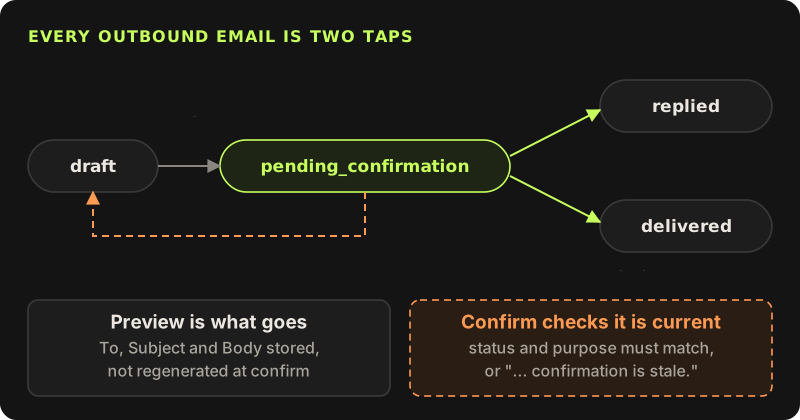
The first tap creates a preview: the exact To, Subject and Body are stored on the job as a pending email and shown in the chat. The second tap sends that stored email, not a freshly generated one, so what you approved is what goes out. Confirm also checks that the job is still waiting on that exact email. If a different email is pending, or none is, it fails with a message like "That outreach confirmation is stale."
Cancel is always available while an email is pending. It clears the pending email, sets the status back to draft and says plainly that nothing was sent.
Demo mode fails closed
This project talks to WhatsApp, OpenAI, a lead source and an email provider. In a demo, none of those should ever be called by accident.
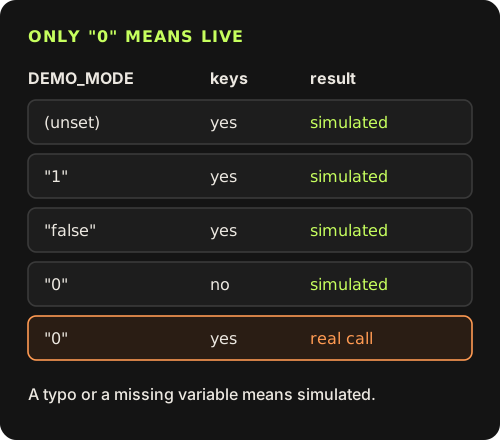
Every provider call is guarded by the same condition: real calls happen only when DEMO_MODE is exactly the string "0" and the provider keys are set. Unset, "1", "false", a typo: all of them mean simulated.
I chose that direction on purpose. A guard written as "demo if DEMO_MODE is true" turns a missing variable into live calls. Written this way, the only way to reach a real provider is to ask for it explicitly. The email simulator in demo mode has no network code in it at all.
Limits
This is a demo, not a deployed product. The leads, the price book and the roof measurements in demo mode are fixtures. There are 19 tests across 6 files, which cover the chat boundary, WhatsApp formatting, documents, pricing and Meta errors, but nothing has run against real customers.
The reply scrubber is a heuristic. It is tuned to throw away too much rather than too little, and it will sometimes drop a harmless sentence. That is the right failure for this job, but a regex is not a proof.
And the model still sees the conversation context, including lead addresses. The request uses store: false, but anyone adapting this should treat what goes into the prompt as data that leaves their system.
Let the model classify, not act
Return an intent and an option id in strict JSON, and fall back on any error.
Scrub what the model says to the user
Drop replies that mention prices, links or finished actions, and use your own wording.
Allowlist against what was shown
An option id must be on the menu this user saw, and the menu must be recent.
Run actions only on taps, and check taps again
Menu, freshness, ownership and stage, every time.
Make outbound email two taps
Store the exact preview, send that, and always offer cancel.
Fail closed in demo mode
Only an explicit "0" plus keys reaches a real provider.