· 8 min read
Caveman mode for Claude Code: fewer output tokens, same facts
What the caveman plugin does to Claude Code replies, how to install it and switch modes, what its own numbers say, and when terse output costs more than it saves.
Claude Code is polite. Ask why a component re-renders and you get a paragraph that restates your question, explains the cause, suggests a fix and offers more help. In a terminal, at the end of a long day, I want the fix and the reason. Nothing else.
Caveman is a Claude Code plugin (and a skill for many other agents) that does exactly that. Its tagline is "why many token when few do trick". Under the joke is a careful set of writing rules. This post covers what it is, how to install it, the modes, what its own repository measures, and the cases where I turn it off.
Everything below comes from the plugin files installed on my machine (version 3.1.0) and the public repository. Where I quote a number, it is the repository’s number, and I say so.
JuliusBrussee/cavemanThe caveman repository: the skill, the Claude Code plugin, the optional proxy CLI, and the benchmarks behind its numbers. Apache-2.0.github.com/JuliusBrussee/cavemanWhat it actually changes
The core is one skill file. It tells the model to answer first and then give the reason and the next step, to drop greetings, hedging and recaps, and to use short words. Articles like "a" and "the" are optional. Words that carry meaning are not: the rules say never to drop not, never, no, only or except, and to keep numbers and units exact.
The rule I like most is "payload verbatim". Code blocks, commands, file paths, API names and error messages are copied character for character. Only the prose around them gets shorter. The README shows the same React answer three ways:
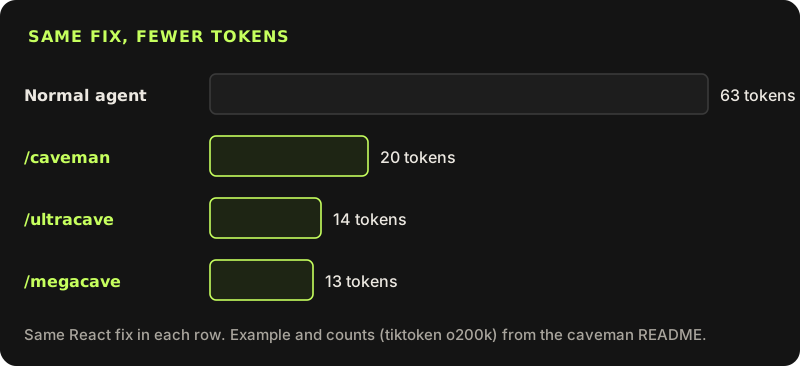
The reason your React component is re-rendering is likely because you're creating a new object reference on each render cycle. When you pass an inline object as a prop, React's shallow comparison sees it as a different object every time, which triggers a re-render. I'd recommend using useMemo to memoize the object.New object ref each render, so React re-renders. Wrap the prop in `useMemo`.The facts are the same: a new reference each render, React sees a change, useMemo fixes it. What is gone is the ceremony. The skill also says caveman is "a voice, not broken grammar". There is no "me think" and no caveman prefix, and if the terse version is not actually shorter, plain wins.
Why fewer output tokens matter
There are three reasons, and they are not equally strong.
Cost. Output tokens are billed, and on most model price lists they cost several times more per token than input. The skill file puts it simply: every output token is billed and read, so filler costs twice.
Speed. A model writes its answer one token at a time. A shorter answer finishes sooner. In an agent session with many turns, that adds up to less waiting.
Reading. This is the one I feel most. I read every reply in a terminal. An answer that starts with the cause, not with "Great question", saves my attention, which is the scarcer resource.
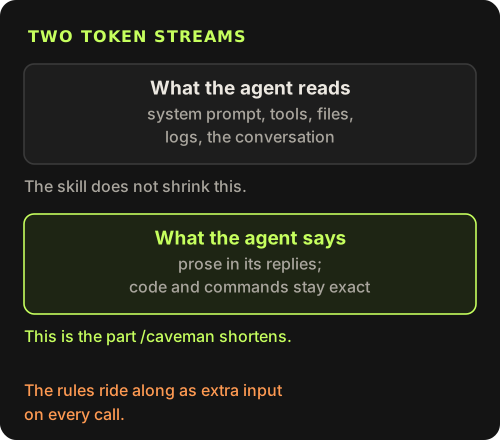
The important limit: the skill only shortens what the agent says. It does nothing to what the agent reads, which in a coding session is usually much bigger: the system prompt, tool definitions, files, test output and the conversation. The repository’s own Honest Numbers page lists the skill’s input reduction as 0%. For input, the project has a separate, optional proxy CLI, which I cover near the end.
Install it in Claude Code
Add the marketplace and install the plugin
This is the Claude Code route from the README and INSTALL.md. The plugin starts caveman automatically in every session.
claude plugin marketplace add JuliusBrussee/caveman && claude plugin install caveman@cavemanOr do the same from inside a session
The public README lists the slash-command form too.
/plugin marketplace add JuliusBrussee/caveman
/plugin install caveman@caveman
Restart and check the flag file
Hooks are read once at session start. INSTALL.md says the active mode is mirrored in a small flag file.
cat "${CLAUDE_CONFIG_DIR:-$HOME/.claude}/.caveman-active"
# expected output: caveman
Update with the full name
The plugin and its marketplace are both called caveman, so the short name fails with "Plugin caveman not found". Use plugin@marketplace.
claude plugin update caveman@caveman
If you only want the skill, without hooks, npx skills add JuliusBrussee/caveman -g installs it for Claude Code and other agents. Then type /caveman to start it. One version note: my machine runs 3.1.0, while the public README now pins its install scripts to v4.0.1. The plugin commands above are the same in both.
Modes and levels
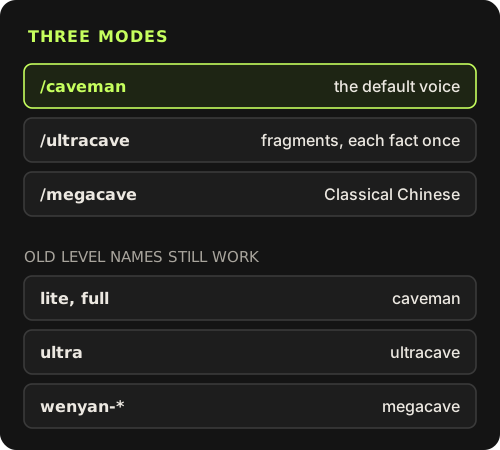
There are three modes. /caveman is the default voice described above. /ultracave (alias /caveman ultra) strips grammar further: fragments, one word when one word is enough, each fact stated once. /megacave (alias /caveman wenyan) answers in Classical Chinese, with technical terms left in their original script; its own skill file says the token savings are small and noisy and must never be claimed.
Older releases talked about levels: lite, full, ultra and wenyan. The 3.1 config code still accepts those names and maps lite and full to caveman, ultra to ultracave, and any wenyan variant to megacave. A mode sticks for the whole session until you change it.
/caveman statusreports the current mode and changes nothing./caveman off, "stop caveman" or "normal mode" switches it off./caveman-helpprints the reference card.
You can also change what a new session starts in. The help card lists an environment variable, which wins, and a user config file. Setting the default to manual means sessions start off and /caveman turns it on, which is how I would roll it out to a team that has not asked for it.
# highest priority
export CAVEMAN_DEFAULT_MODE=ultracave{ "defaultMode": "manual" }How the plugin wires itself in
The plugin is small. Its manifest registers two hooks, and a third script runs when you ask for stats.
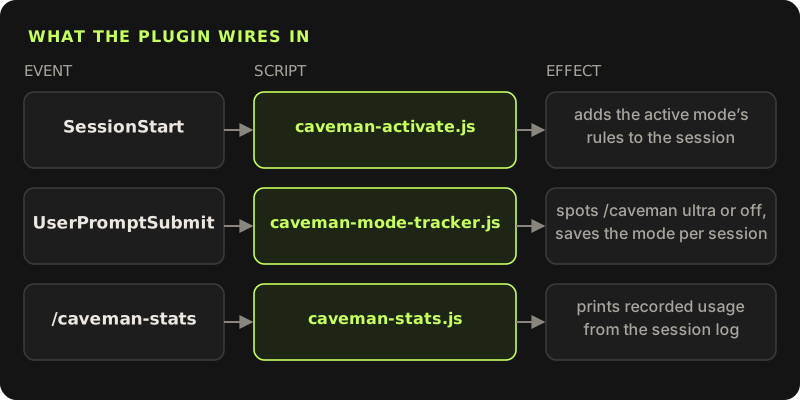
Each window keeps its own mode in a file under .caveman-sessions/ in your Claude config folder, so two sessions can run different modes. /caveman-stats reads the session log and prints the tokens actually recorded. It reports savings as unknown, because a session has no measured twin without caveman to compare against. I like that honesty more than a made-up percentage.
The plugin also ships helpers I use more than I expected: /caveman-commit for one-line Conventional Commit messages, /caveman-review for one-line review findings, and /caveman-compress <file> for shrinking memory files like CLAUDE.md while keeping headings, code blocks and paths. The repository reports about 46% smaller files across five fixtures for that last one.
What the numbers say, and what they do not
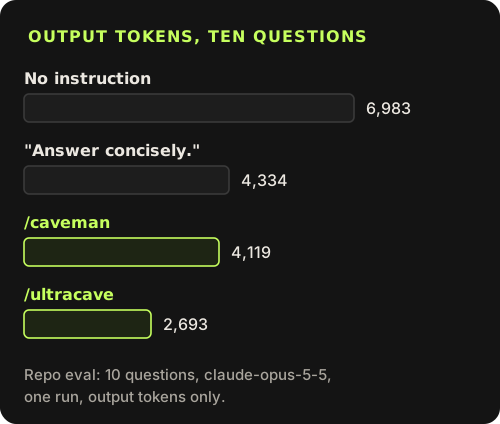
The README’s eval asks ten developer questions on claude-opus-5-5. With no instruction, the answers totalled 6,983 output tokens. With "Answer concisely." they totalled 4,334. /caveman gave 4,119 and /ultracave gave 2,693. The repository makes the point itself: new models already know how to be concise, so that one line is the fair baseline. Against it, the Honest Numbers page reports caveman 3% shorter, ultracave 35% and megacave 9% at the median, from ten questions in a single run, measuring length only.
The README also cites outside work: a JetBrains A/B over 86 coding tasks that found 8.5% fewer output tokens and no measurable quality loss, an Adobe Research paper reporting 1.4 to 2.4 times lower cost for caveman-style output across eight models, and an Elastic adaptation with 63.6% fewer response tokens. Those are their numbers, in their setups. The honest summary for plain /caveman on a modern model is: a little shorter than asking for concise answers, and noticeably easier to scan.
When terse output hurts
Caveman has a cost side, and the project documents it better than most tools do.
- The rules are extra input on every call. The 3.1 README estimates about 1,000 input tokens per call and the current one about 1,160; the Honest Numbers page says the real cost depends on caching and was not measured. In short coding Q&A, one user measured a net loss (issue #145).
- Per-request billing gets nothing. If your plan charges per request rather than per token, as GitHub Copilot premium requests do, a shorter answer costs the same.
- Learning needs full sentences. When I am new to a codebase or a library, I want the explanation, not the verdict. Fragments assume you already share the context.
- Two readings of one fragment. "Migration drop column backup first" can be read two ways. The skill’s own fix is "Back up first. Then run migration: it drops the column." Ambiguity is worth more tokens than it costs.
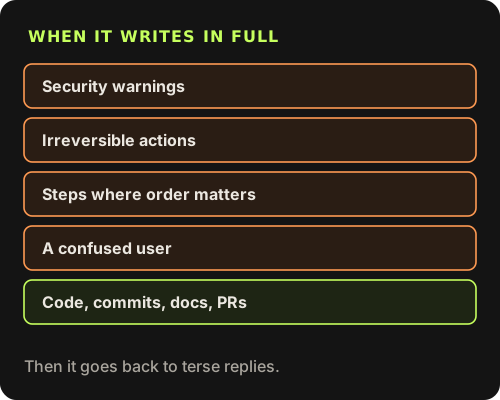
To its credit, the skill switches to plain prose by itself for the riskiest cases: security warnings, irreversible actions, step sequences that a fragment could scramble, a user who seems confused, and anything written outside the chat, such as code comments, commits, docs and pull requests. Those exceptions are the reason I trust it enough to leave on.
A note on the proxy
The bigger savings the README advertises come from a separate tool: the @caveman-ai/cli proxy, which compresses what the agent reads, such as logs, JSON and test output. It is a different trade-off. INSTALL.md says that routing Claude Code through it sets ANTHROPIC_BASE_URL in your settings, which makes Claude Code Remote Control unavailable while routing is on, and the README says the CLI sends usage statistics by default (caveman telemetry off or DO_NOT_TRACK=1 turns that off). Read both before you install it. The skill alone runs locally and sends nothing.
How I use it
I keep /caveman on for routine coding sessions, switch to /ultracave for quick yes-or-no checks, and say "normal mode" when I am learning something or need a careful explanation for someone else. If you try it, run the same task with and without it and compare your provider’s usage page. That is the test the project itself recommends, and it is the only number that counts for your workload.